—    —  Home

   jamesprimate on October 22, 2014, 09:28:01 AM:

^ indeed! dont want to spoil too much, but there are a number of aerial regions.


no not Ariel Tongue


   jamesprimate on October 22, 2014, 12:15:51 PM:

A flooding mechanic is in the works! But let's finish this one first, lololol


   jamesprimate on October 22, 2014, 04:10:55 PM:

no mouse controls, just up down left right A B stuff. want to keep it simple and feel equally good on both controllers and keyboard  Hand Joystick  Hand Any Key  Hand Any Key


   jamesprimate on October 22, 2014, 06:27:23 PM:

^ real talk


   JLJac on October 22, 2014, 11:07:11 PM:

Hahahaha hi everyone! I think my idea for the rain has been that it's like... yeah, the "fire hose to the face" analogy is pretty much it - like, a combination of pummeling and drowning. And yeah, water totally have a lower terminal velocity than that  Who, Me? I think that you can't even call this a "fantasy" universe though, it's way more removed from our reality than that. It's more of a "cartoon" universe, or something like that.

Update 344

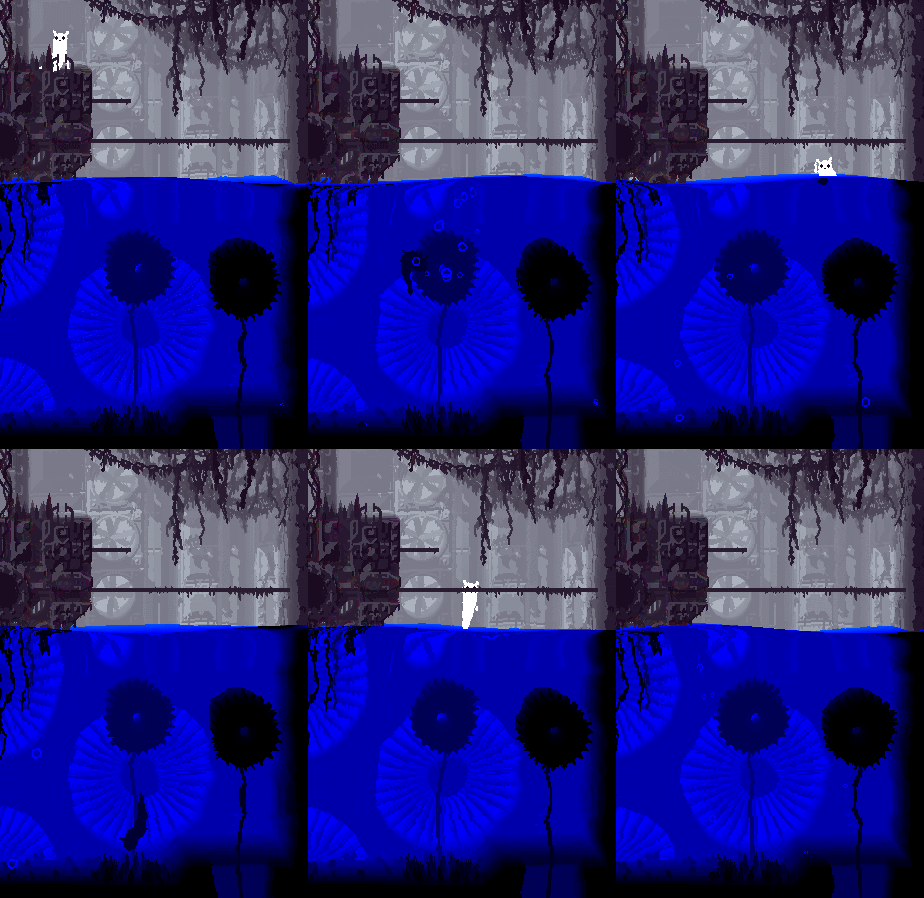
Swimming!


This has turned out to be quite fun - to the degree where my productivity suffers because I just have to fill this and that level with water and swim around in it.

When swimming you have a "swim power", some sort of momentum, which can be made to increase by doing certain movements, such as changing your angle. This means that just holding a direction isn't always the most effective way to move, you need to work with the water a little bit. If you bump into a wall you lose your momentum - so generally when you're under water you want to stay clear of the walls, which is trickier the faster you're going.

Swimming comes in two modes - surface swimming and deep swimming. The surface swimming is generally pretty lame, the slugcat will just keep its head up and you can steer left or right. What it does have is the ability to do a little hop by pressing the jump button, enabling you to maybe reach for some pole or ledge above you. Underwater swimming is faster (if you work up momentum) and more fun, but will be dangerous in one way or another. You have some buoyancy pulling you upwards, so you can do some pretty fun stuff by swimming down and then come up through the surface fast. If you have really good timing, you can manage to press the jump button during the few frames you're in "surface mode", get a little extra momentum from the mini jump, and do a pretty sweet jump up into the air.

I still haven't gotten around to doing anything about the coloration of the water, but I think it's going to be pretty straigh forward as the entire underwater environment is basically just a gradient between two colors - so it's just a question of picking two colors that fit the above-water palette.

As you can see the slugcat is made dark when submerged... I have tried a few other things as well, such as having it be the original color but with a multiply overlay, or similar. Any solution with the actual colors visible turn out to be less cool though, for some reason. I think it's because when everything under the surface has the same colors it really feels like a different "realm", whereas if the original colors are visible it just feels like a blue overlay. The problem here is that it's harder to see your player character, and also that in a multiplayer scenario it might be hard to keep them apart, if several players dive down simultaneously. Still it kind of is that visual obscurity that makes for the effect, so idk... What do you guys think?


   jamesprimate on October 22, 2014, 11:33:40 PM:

so perfect! dont change a thingggg. I can hear the sploosh clearly in my head when the cat dives into the water, it looks that good


   JLJac on October 23, 2014, 07:17:50 AM:

Thanks! Smiley

so perfect! dont change a thingggg. I can hear the sploosh clearly in my head when the cat dives into the water, it looks that good

That's really good, as it's you who's gonna do that splash sound, mate! Hahaha!

I've never really been a fan of (wavy) water in 2d platformers, it feels like the world just ends at a glass pane or something to me. You managed to make it look pretty though, so I'll get over it Wink My only gripe would be that the water behaves very rubbery when you dive in, like it's jelly you're swimming around in rather than water. The swimming itself looks really cool, and I think the slugcat being darkened while submerged works well.

Yeah, me neither - and for a while we did talk about having the water extend towards the bottom of the screen - as if you were watching the level stick up above the surface, from a distance. It gets weird very quick though, because this whole platformer perspective thing doesn't really work if you try to think of it in 3D. If you saw the surface, and the level stick up out of it, you'd all of a sudden feel like you're viewing the creatures from a distance - which is weird, because it uncomfortably places the viewer in the scene - and 2D and 3D spatiality collide. Also, when looking at a normal level, you're kind of seeing the inside of walls, maybe? Doesn't really make sense to have a cut-in-half building like that stick out of an ocean and view it as through binoculars...

Then come the practical stuff - if what you see was the surface of the water, you wouldn't be able to see what was going on beneath it. And when the surface is above the horizon? (Yeah, the game has a "horizon" it uses for the pseudo 3D stuff, it's 1/3 down from the top of the screen). In the end, the aquarium approach was only the really thing that made sense. And I've kind of learned to like it, it makes it feel like you're looking at a little model of a room or something Smiley

I love the effect. One thing I noticed: The impact when the character jumps into the water is very heavy, which makes it look a bit like a miniature world. Don't know if I can explain it correctly, but right now it feels like in a bathtub, very small.
Yeah, I've really been struggling with the jelly-ness of it. That's the least jelly I've managed to get it to, but now when I've tried to rewrite the thing to work with multi-screen rooms the jelly wobble is worse than ever  Tired If anyone can point me to a nice and simple description of how to actually simulate a water surface I'd be really happy. Haven't managed to find one myself - the wikipedia article wasn't easy enough to work with.

Oh and maybe if lizards are underwater, only their flashing colors would be visible, like the bioluminescent nature of deep sea creatures. Imagine how tense that would be. You dive underwater, and don't realize a lizard is nearby because it's hard to see and kind of camouflaged against the other dark things underwater. And then a flash of color in the darkness and a dark shape starts rushing towards you...
I haven't had a proper talk with James yet, but I'm kind of leaning towards not having many creatures that are both land and water dwelling - it's easier and feels cleaner to have some separate (vicious!) water fauna that will eat whatever falls down there. But it's all open for discussion right now - currently I'm just trying to get the damn water to work haha!

I love the effect. One thing I noticed: The impact when the character jumps into the water is very heavy, which makes it look a bit like a miniature world. Don't know if I can explain it correctly, but right now it feels like in a bathtub, very small.
I think the main thing here is the distortions close to the surface. And also the jelly like qualities of the water, making it seem as if surface tension is really strong. The jelly I'm not so happy about, but I kind of like that the water looks like it's small and close, a little bit of confusion over the scale of things seems fitting when you don't want to pin stuff down too much. Obviously the slugcat isn't half an inch tall and taking a bath in a droplet, but that little effect serves as a reminder that we don't actually know all too well what we're looking at.

By the way - and maybe this has been answered before and I missed it - what is the penalty for dying in the game? Do you start all over from day one with no flies?
The classic idea, which we're still holding on to, is that you'll be allowed to restart the "cycle" - a cycle is basically a level, except it's not geographically contained, so more like a "mission" or whatever name you want to use for "chunk of play". In a cycle you wake up from hibernation, go out and try to hunt for food, and need to return to hibernation before the rain gets you. Hibernation acts as save points, meaning that if you die you get to retry that cycle.





   jamesprimate on October 23, 2014, 11:56:05 AM (Last Edit: October 23, 2014, 12:13:01 PM):

Quote
I'm kind of leaning towards not having many creatures that are both land and water dwelling - it's easier and feels cleaner to have some separate (vicious!) water fauna that will eat whatever falls down there.

totally agreed! i like the idea of water creatures being so nasty that even lizards are like NOOOOOOPE


On the subject of jelly water: this is probably some crazy fantasy alien planet or whatever, that "water" could be liquid helium or methane where the viscosity is higher than h20. same with the "rain". in my mind, subtle weirdness is an asset. as long as it looks cool!


   jamesprimate on October 23, 2014, 12:17:19 PM:

LOL, you guys are so ahead of the curve. getting it all BEFORE its on Destructiod: http://www.destructoid.com/slugcat-gifs-slugcat-gifs-282920.phtml

 Cool


   jamesprimate on October 23, 2014, 02:21:20 PM:

On the subject of jelly water: this is probably some crazy fantasy alien planet or whatever, that "water" could be liquid helium or methane where the viscosity is higher than h20. same with the "rain". in my mind, subtle weirdness is an asset. as long as it looks cool!

i'm fine with the color being weird! alien planet's all great and i'm down for it. but on a purely aesthetic level i think the color being so saturated is at odds with the rest of the game/areas, which is pleasantly desaturated + has excellent color use

also that thing i said about gradient background etc etc

63

yeah totes! i was talking more about the physics. the water color is just temporary, and pretty extreme contrast just so he can see whats going on. In any case, we are looking at a number of regions which will have water elements, and so the color of the water in each will be adjusted to fit the palette of the region, etc etc.


   JLJac on October 23, 2014, 11:49:46 PM:

Update 345

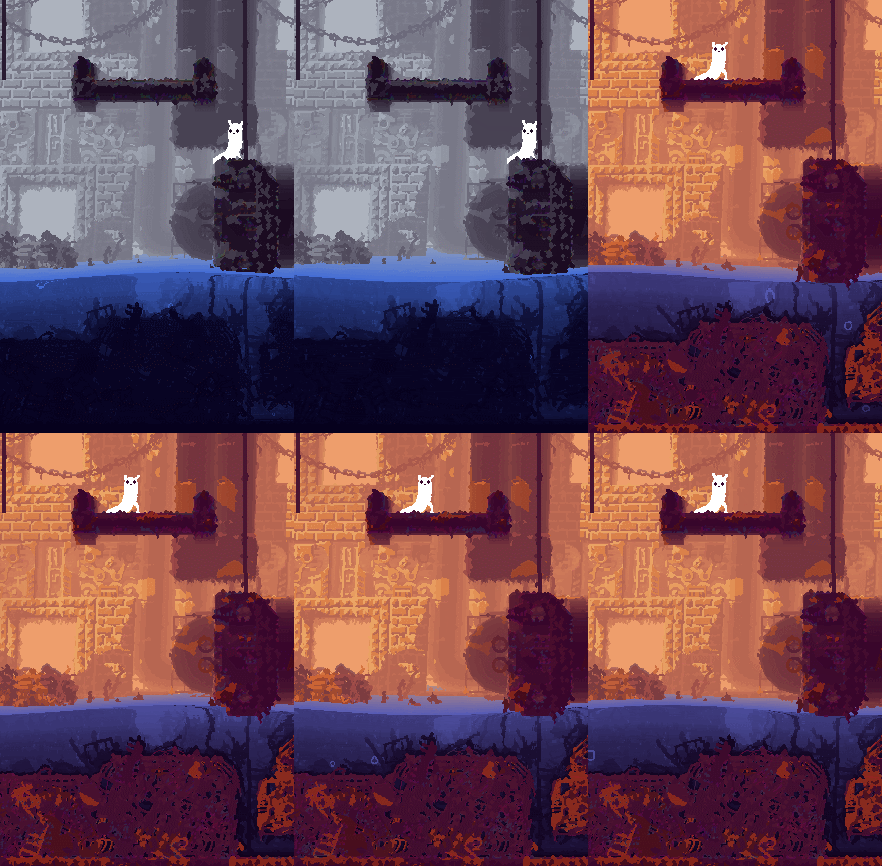
Finally I got to color - I needed to rewrite my way of handling palettes (and thereby also my shaders) so that each palette is its own png. Feels much more reasonable. I think that we can also do gradient changes between palettes using this system without writing a shader for it - the palettes are 32*8 textures, and I think that a palette swap effect could be achieved by just doing copy pixels on the currently active one in the CPU, the GPU wouldn't even know anything was happening.

That said, I'm feeling a bit weird, because everyone has been telling me that performance is super important when writing shaders... And my experience has been that I can get away with anything. Maybe my computer has a very fast graphics card? Pretty much whatever I do they seem to run perfectly fine, the only problem is that they tend to sometimes not work at all, which seems like a different issue...

Anyhow, messed with the palette stuff, and made it so that the palettes contain positions for water coloration as well. I also added an option that the water can be "behind" the foreground, as James requested being able to do puddles and pools without necessarily having the entire level look submerged:


Water colors are still WIP, but at least more reasonable. Creating palettes is for some weird reason one of the most time consuming activities in making this game hahaha! I can tweak those colors for weeks before it feels right - so I'm pretty sure that the water is going to go through a few such iterations as well.

On top of that I managed to make it so that Unity is more comfortable with my shaders - it doesn't give error messages or anything, and it actually agrees to build the standalone! But the shaders are still all white, so that's going to need more messing around.

I've also tried to look into some wave equations in order to make the surface less jelly-like, but it's all written in physics or math language that I'm not really literate in Sad Maybe if I give it a serious go I can achieve some sort of breakthrough - after all I'm not trying to do an accurate physics simulation for calculations or anything, I just want it to look somewhat correct.

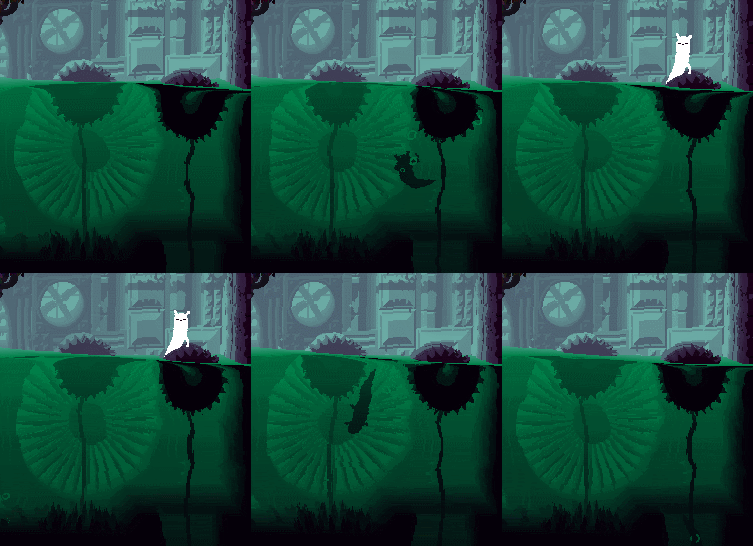
Happy weekend!


   JLJac on October 24, 2014, 05:36:17 AM:

Hahahaha thank you thank you thank you  Cheesy

cat gives the water a weary eye


...keep projecting! That's the juice this entire machine runs on! Cheesy Cheesy Cheesy

You guys seem so enthusiastic I'm gonna give you another one today ~

Update 346
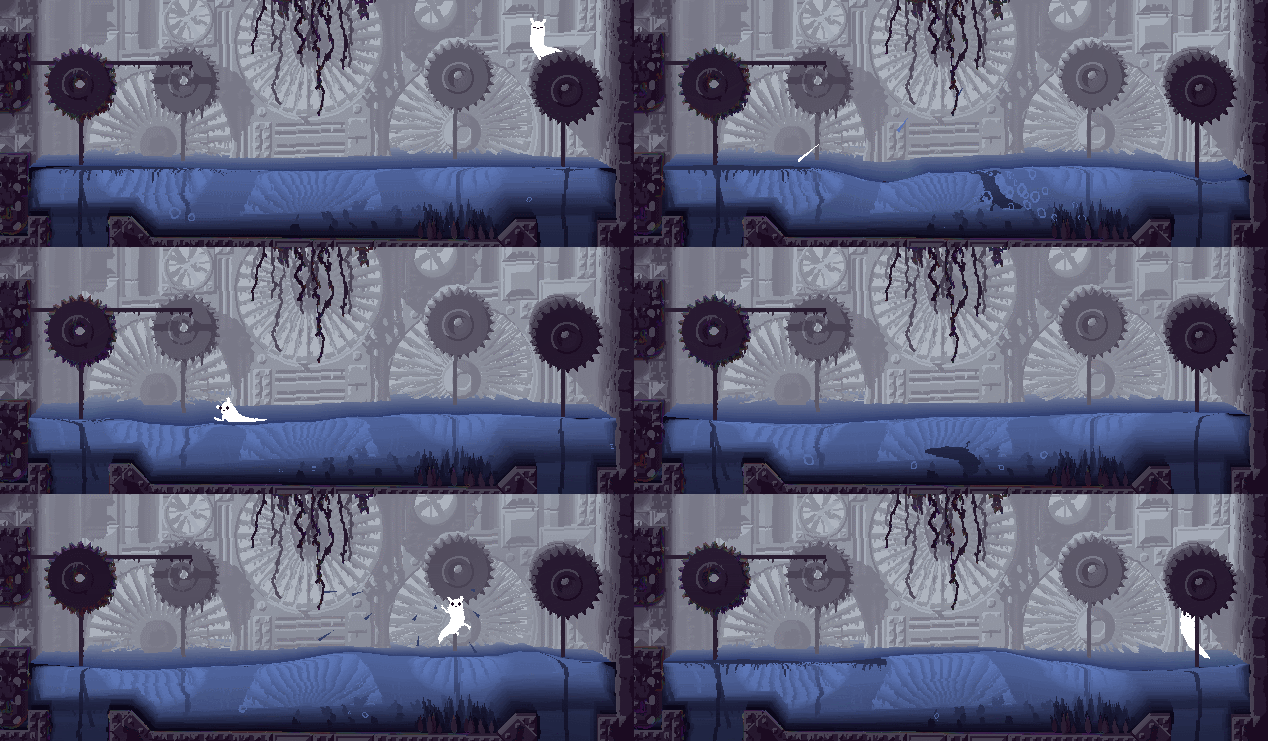
Worked some on drowning mechanics, and I'm pretty happy with it! Basically, it's an interaction between two paramaters, Air In Lungs and Lung Exhaustion. The air meter is just an air meter, when it reaches zero you die. At 2/3 air left, the slugcat will give a single bubble, which can be spotted by an attentive player and is basically your cue that it's time to stop doing whatever you're doing under water. At 1/3 air, the slugcat will start to move its arms more and faster, emit a lot of bubbles, move a bit slower, the input direction will involuntarily tend upwards. This is the panic mode, now it's really time to just get up to the surface.

Here's the thing though, when in panic mode, your lungs get exhausted. This is bad for several reasons - when your lungs are exhausted, you take in air more slowly once you've gotten up. If you dive down again with your lungs still exhausted, you lose air faster. Once your lungs have become exhausted, you need to get up, fill the air meter (which is now slower) and then when the air meter is full the lung exhaustion meter will start to tick down. You can see that the slugcat is exhausted because it's closing its eyes and breathing heavily - once it opens its eyes it's safe to go down again.

This sounds complicated, but when actually playing it the implications are pretty simple: go up for air every now and then, and you'll be fine. If you really try to stretch your stay under the surface though, you'll need to stay up longer the next time you get up, to get rid of the exhaustion. This means that if for example some creature is harassing you above the surface, you can't stay away for ever by just popping down and up - if you're down for a long time, you'll need to be up for a long time as well.

If you dive down with fully exhausted lungs, you get only half as much time on the air meter, 4.5 seconds instead of 9.

I have implemented a mechanic which is that if you're in panic mode, and the only input you give is straight up, the air meter will deplete slightly slower. Basically I'm just cutting the player some slack - you're moving straight up towards the surface, it just feels unnecessarily unfair to have you die 40 pixels from the surface, especially as rain world death is a binary switch.

The entire system means that if you're just like, in a pool swimming and diving, it's perfectly comfortable. You can be confident you're not going to die. But as soon as you're trying to do anything under the surface it becomes tricky as you'll really have to work with the swimming mechanics and the air meter. Especially anything that involves swimming in under a ceiling separating you from the surface feels super uncomfortable - which is just the way I want it.

Here's the slugcat almost drowning, but getting up, recovering and continuing its dive.


   JLJac on October 24, 2014, 05:48:12 AM:

Here's how I imagine you're supposed to work with the water - quick in quick out operations taking advantage of the physics and controls, and drowning won't be a problem.


I should really stop swimming around and get to work on making those shaders function Who, Me?


   jamesprimate on October 24, 2014, 09:10:56 PM (Last Edit: October 24, 2014, 09:23:04 PM):

good question! Joar and I have discussed this quite a bit. Like you, I also dig a lot of the sounds in the lingo version, which have a pretty cool "industrial but videogame" feel. The ones we use we'll definitely want to spiffy them up a bit, give them all a nice sparkle of hi-fi, much like the visuals here where you can clearly see the "simple pixel platformer" origins, but there is a little more high tech zazz to them.

But don't worry about it turning into mass effect cut-scene "bwaaaah" hi fi audio or something. All the sounds and music in the game are synthesized from or processed through low bit hardware audio sources like vintage moogs, oberhiems, waldorfs and actual old videogame console sound chips (hey thats me!) Nothing goes above 16 bit, and its mostly just weird use of additive, formant and wavetable synthesis, which i feel complement well the otherworldly industrial beauty Joar creates so clearly with the visuals.

Actually, the whole reason i emailed Joar about this project waaaaaaaay back 2 years ago was that i had a nightmare (really!) that someone came along and ruined it with goofy vidya game sounds and music that completely destroyed the mood. So I have devoted my past 2 years 1000% trying NOT to do that!

also:

Flocks of piranhas.

Just sayin'

totally on the same page as this  Hand Thumbs Up Left Hand Thumbs Up Left Hand Thumbs Up Left


   jamesprimate on October 25, 2014, 07:47:05 AM:

Sheesh, believe me, we have quite a long way to go too  Waaagh!


   JLJac on October 25, 2014, 07:43:39 PM:

PARTICLES

It's really strange I forgot this hahaha! Getting to it now... Hard to make it look good though - will take some tweaking.

JLJac what are the spec of your machine? which modern game run on it?

Here are my specs:


As for games, I don't know as I don't have any installed. The computer is an HP envy laptop, very new, but not the most expensive power monster on the market.

@Rojom, on the subject of fur, we kind of have schrödinger's slugcat here... I'm not confirming that it's furry, but I'm also not confirming that it's not furry. You'll just have to float around in uncertainty, sorry  Tongue


   jamesprimate on October 25, 2014, 08:31:39 PM:

Christian knows what's UP


   JLJac on October 26, 2014, 07:39:41 PM:

Unity, C# and Cg shaders Smiley

@JIMBERT, as always, thank you sooo much :D It might be the case that I'll have to write some alternative shaders and include graphics options... We'll see how it works when we have an alpha we can try on a couple of computers.

Update 347
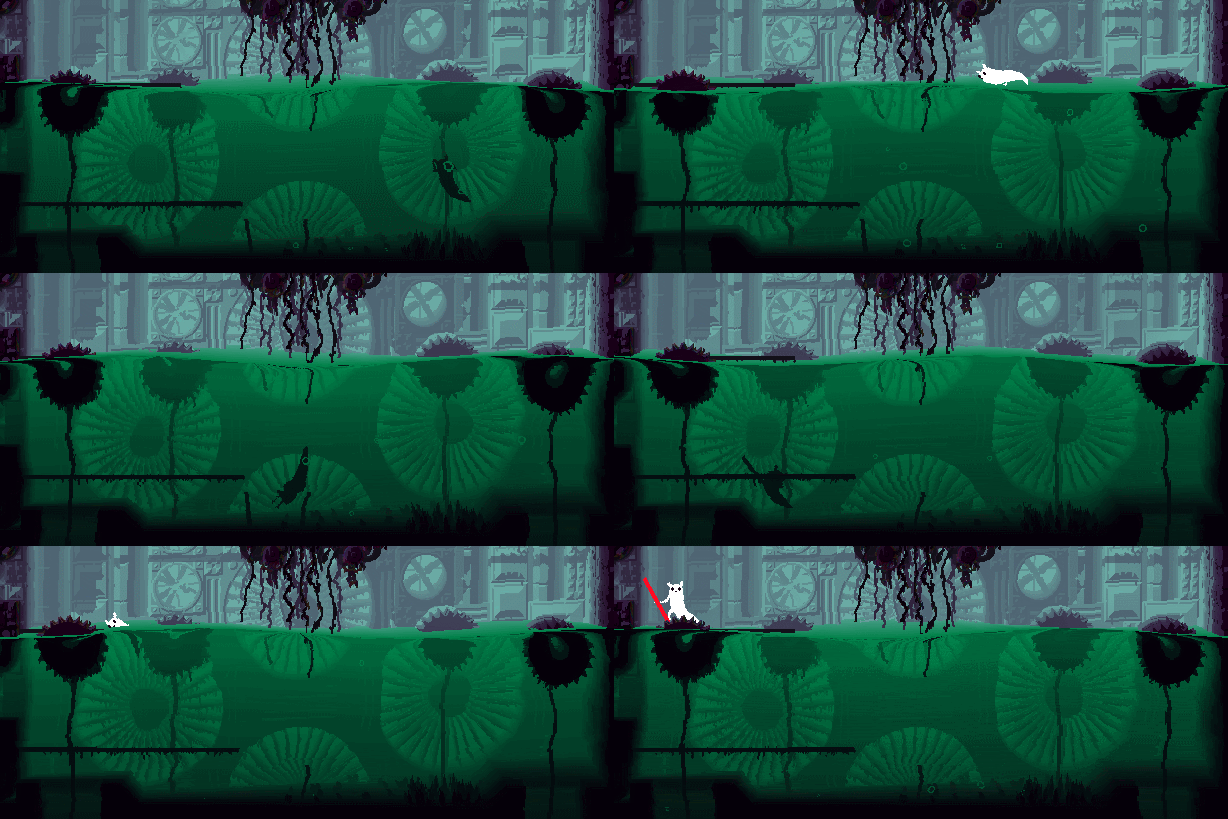
I had enough of the jelly, so I scavenged the internet for some 1d wave equations. After a while I found one in some kind of academic paper, but they had also included some mathlab code - somehow I managed to lift that without necessarily understanding much of it. A lot of tuning later, we have correct(er) wave motion on the water surface:


I even faked a bit of interaction with the walls - if you look carefully you might see that the waves bounce off the walls a little bit. They don't do that if the water is in the "in front of terrain" mode, so the difference has actually been upgraded to not being strictly cosmetic. I also did a bit of optimization by having it not simulate the entire surface when in this "behind terrain" mode, instead it looks for the leftmost water tile and the rightmost, and create the surface between those.

Other than that I've done a very slight little vertex shader on the surface of the water, which you're probably not noticing but which is giving it a bit more depth. If you can kind of see the waves on the surface a little bit, that's it. Earlier the surface was just a flat color blob, now it has some small amount of shading depending on angle. I'm always hesitant about that sort of stuff, as the art style I'm trying to roll with here is flat colors, but I think that if it's subtle like that it can get a pass.

Hm, what else... I tilted all the polygons in the water mesh, so that in the darker palettes (like the green water) you get a bit of an impression of light coming in at an angle through the water. And I added some droplets, which I'm not perfectly happy with, I'd like some more impressive splash, but a more impressive splash seems like it'd take yet another custom shader, so they're good enough for now...

Now I can't really claim I need to do something else, so I better get those shaders working, haha~


   JLJac on October 26, 2014, 09:49:09 PM (Last Edit: October 26, 2014, 11:38:32 PM):

Thanks! No, that's not the problem any more - now the build builds, but the problem is that the shaders are all white. Even if I replace their content with the code from the one shader that is working (level coloration). If I give the sprite a color, the sprite will have that color instead of whatever color the shader tells it to have. So things kind of seem like that the problem isn't that the shader isn't working, but that the shader isn't there. What I'm currently thinking is that the problem is this - ie that the shader is not included in the build because unity doesn't find a material using it.

Do you know of any way to force Unity to include some element in the build?

 Gentleman


Edit: Nah, that probably wasn't it as everything in a resources folder SHOULD be included. Now I've isolated the problem to the following: Whichever shader has the name "Additive" works, regardless of content. No other shader works. Hahahaha shaders  Cheesy

Edit edit: Wooooho! Working shaders! I wish I could describe what I did to help people in the future, but it pretty much comes down to Fiddling Around. By accessing the shaders from another place they ... idk, probably that Unity noticed the reference to them. So now it works! Also, under project settings -> graphics you CAN actually create a list of forcefully included shaders. This wasn't the solution for me, but it might be for someone else. I think I'll put my shaders there in either case, because the game can't play without them either way.


   jamesprimate on October 27, 2014, 12:45:08 AM:

playing the water build now and its pretty dang amazing. especially amazing is how well it works with deep / multi-screen rooms. i'll do some little videos in a day or so, because the atmosphere from it is really something youve got to see.