—    —  Home

   JLJac on September 10, 2014, 11:40:52 PM:

Hahahaha if you guys didn't notice the blinking heads until I mentioned them, maybe they're not that big of an aesthetical disaster after all  
Tongue Tongue Tongue

I agree that something has gone missing in the smoothness of the new build though. Research will be directed at finding out exactly what!

Update 305
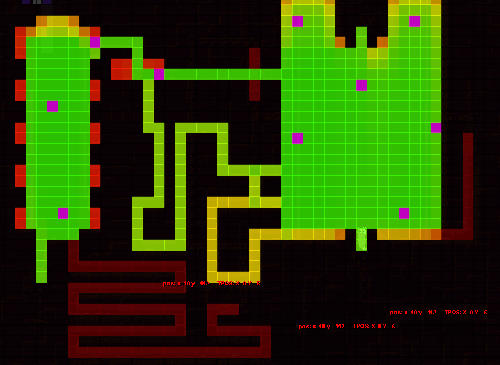
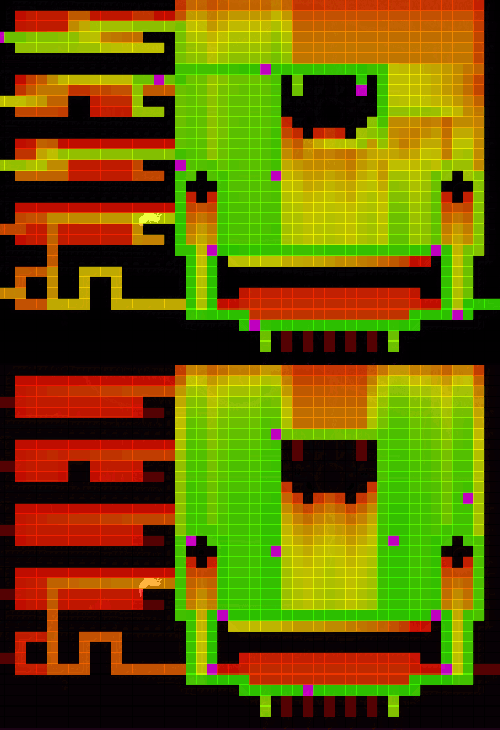
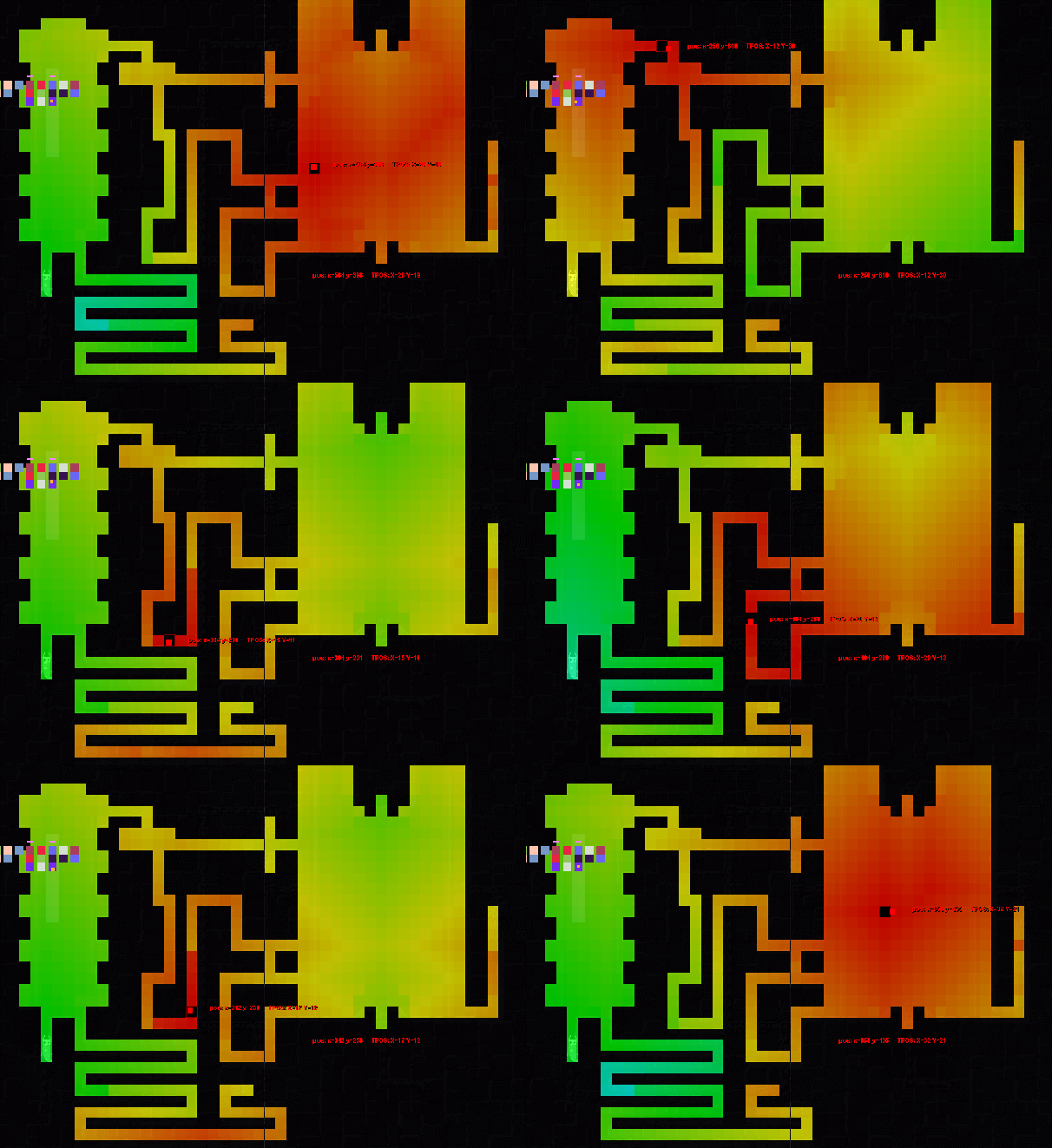
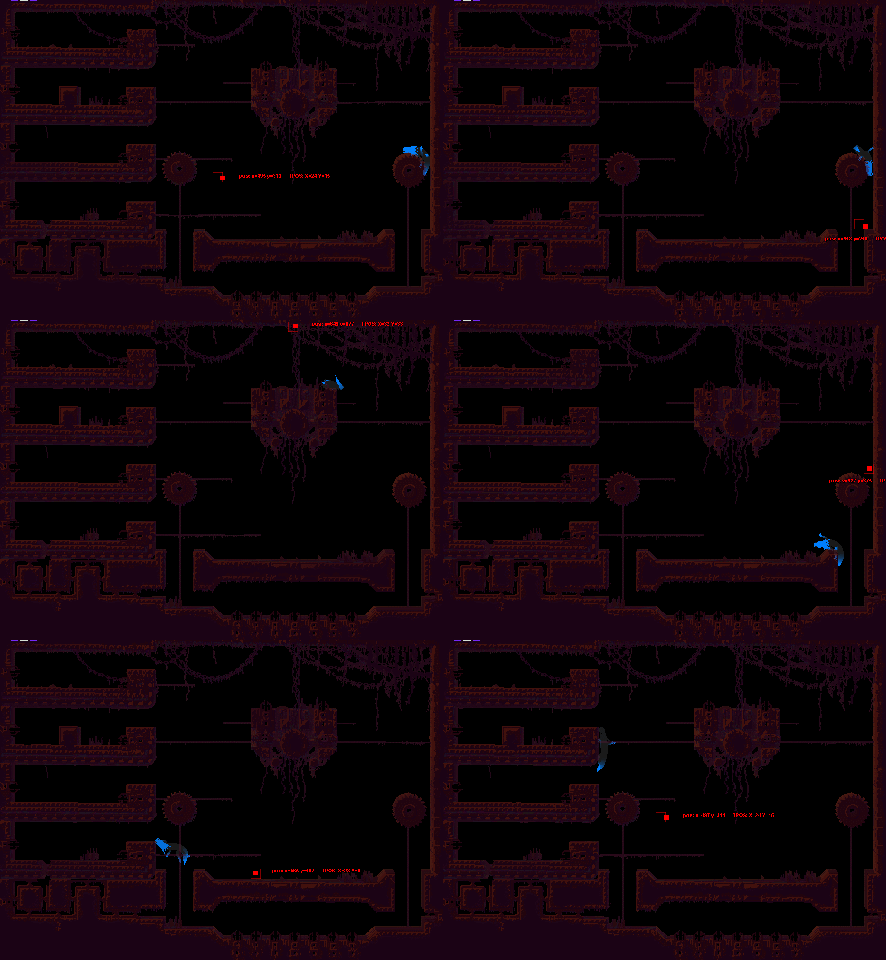
Dead end mapper! I think I've managed to identify dead ends pretty well today, stay tuned for a million screenshots so you can judge for yourself!

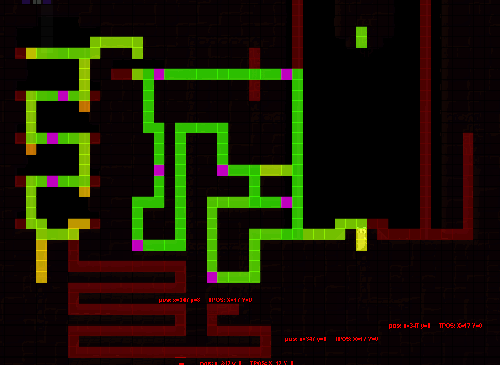
When generating these I disabled short cuts to make it "what you see is what you get" - there're no secret passages between tiles, so what looks like a dead end in the image is actually a dead end. If this is confusing to you let me know and I'll try to explain better. Some images have something that looks like a very obvious dead end but is greener than anything else - those are room exits.

Essentially the way to read these pictures is that red is considered a dead end and green is considered a good area to be in in regards to not being cornered. The AI behavior I have in mind will be able to use these maps for a few things, but I guess the gist of it should be that if you're being chased, gravitate towards greener areas rather than running into the red. If your tile is redder than the tile of the threat, you're probably being cornered and it would be a good idea to find a path back to greener pastures.


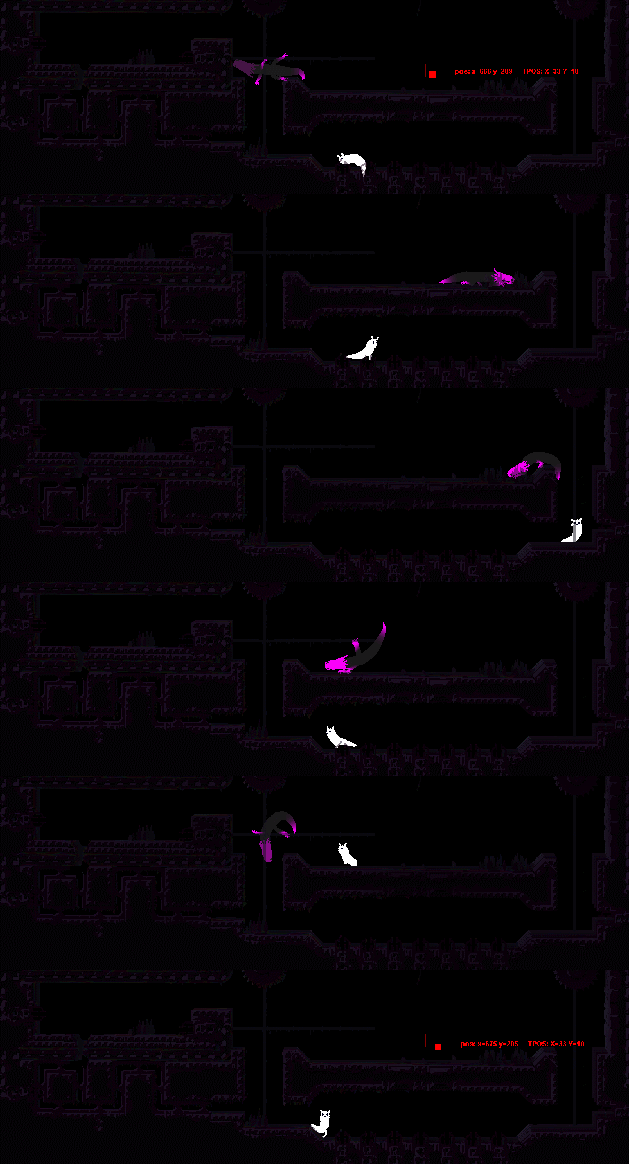
Same level mapped for Fly and Slugcat respectively. The fly obviously has access to air tiles, while the slugcat is stuck on the ground.


See the pink tiles? Those are "fleeing targets", essentially tiles that are A - in "hub" areas from where you can get to other areas without being cornered and B - somewhat evenly spaced. These are few and well defined for a reason - when a fleeing AI doesn't know where to go, it is supposed to be able to evaluate those one by one. Which one of them is closest to me? Which one is the furthest from the threat? Which one of them can I path to without the path intersecting with my threat?

In the difficult scenario of knowing where you want to get away from, but not where you're going, these fleeing targets might give a clue. If you arrive at your fleeing target and still feel panicked you can just pick another one and run around between them at random - you're at least guaranteed not to end up in a dead end.


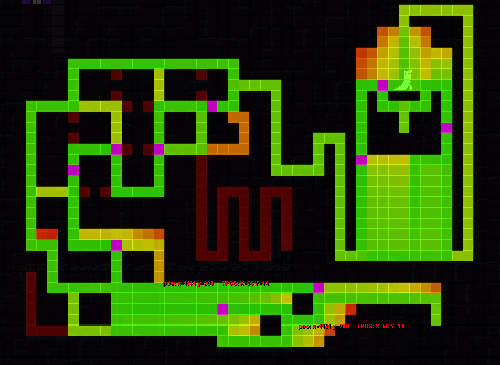
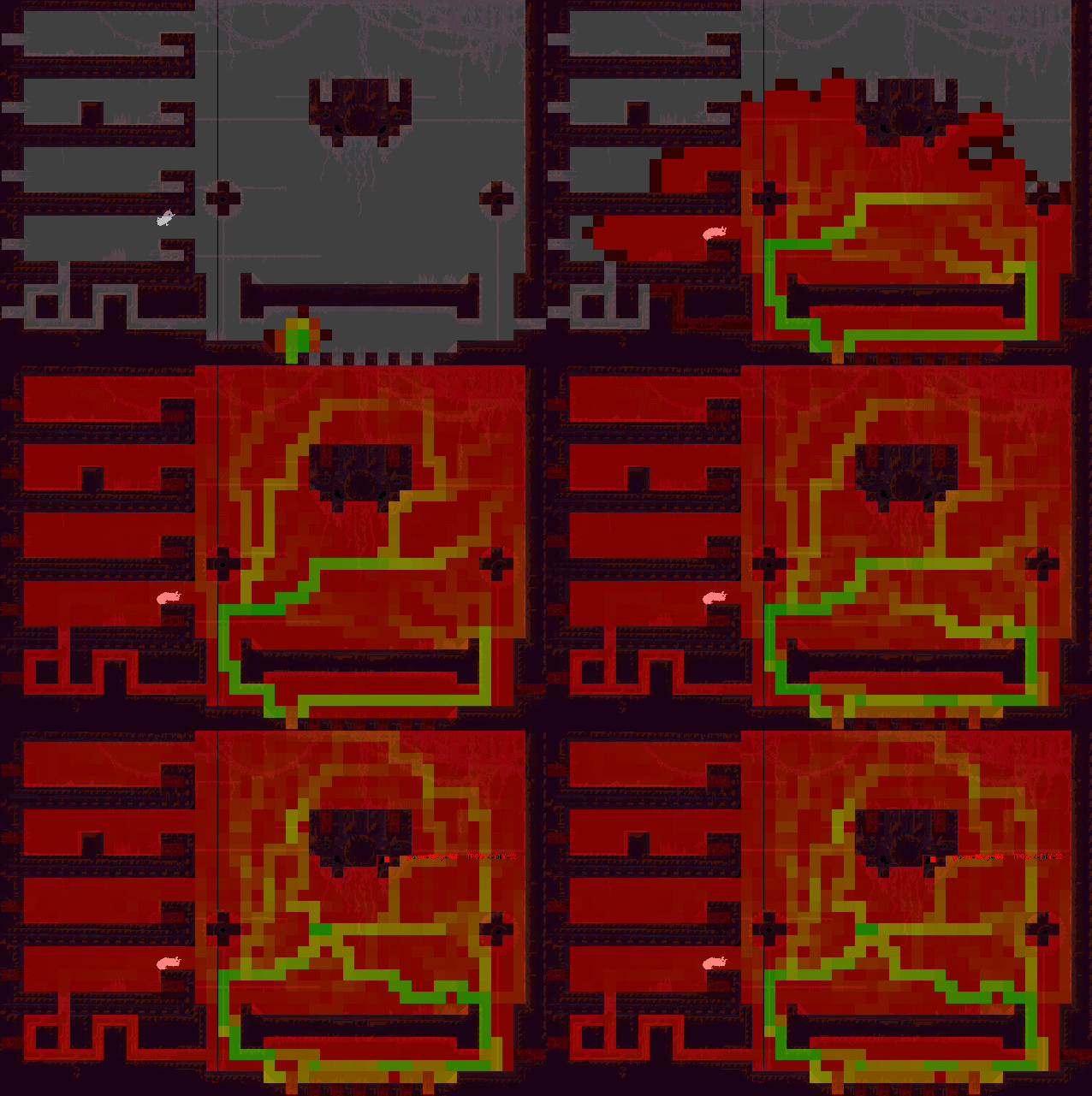
Here's a little comparison - the same map, mapped for the fly creature, with shortcuts turned on and off:


The rooms on the left each have a shortcut in them. Note how when the shortcuts are turned off these rooms are pretty much completely considered dead ends, no self-preserving creature would allow itself to get chased in there. When the shortcuts are on, however, they get a path through them, making them more considerable as fleeing destinations.

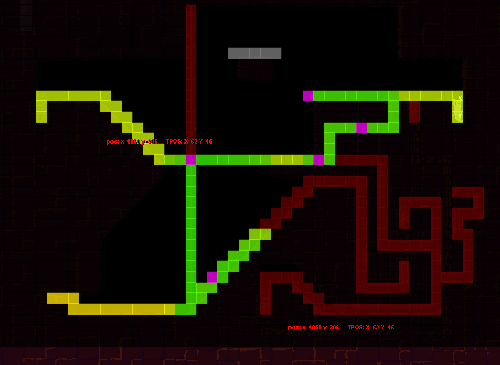
Last for today, a thing that I'm not keeping but which ended up looking pretty cool - I tried to have the algorithm grow at random, and the effect ended up looking like a tesla coil, or veins:


Edit: Just came to think of it, room exits should obviously have a fleeing target each as well.


   jamesprimate on September 11, 2014, 01:49:27 AM:

THIS. UPDATE. IS. AWESOME.


   JLJac on September 11, 2014, 10:06:27 PM:

Ok, so here's a technical question.

These maps take too long to calculate, so I'll just do it once on the first time the level is loaded, the write it back to the level file and have it hang out there.

When I calculate these maps a by-product of that process is a dijkstra map for each exit in the room as calculated for each creature. This is really useful info to the AI, it could do a lot more and a lot faster if it had access to it. Sooo, I'm thinking about perhaps storing that as well, when I'm at it?

Say that a standard level is 50*40 = 2 000 tiles.

Say that I end up with worst case 15 creature types that need to do these calculations. Some creatures share maps as they have the same basic movement, so it'll probably not be that much.

Say that a room has 4 exits, all of which I'm saving a map for. Then I'm also saving the dead end map, so 5 maps all in all.

2000 * 15 * 5 = 150 000

So, a hundred and fifty thousand integers. If the level is bigger, or there are more exits, that number could be even more crazy. If the level is 100*80 instead, we end up at 600 000 integers.

The level text file I have currently is at something like 4kb, and contains something like 3000 integers to store the level geometry. So by that estimation a 150 000 integer level would end up at... 200kb. That doesn't seem too bad? Modern computers have gigabytes of RAM, they should be able to hold those amounts of data? The bigger level ends up at about a meg.

What do you guys think? Is this viable? It seems like such massive numbers. It also kind of is a waste, as not all creatures are in all levels. Also, if you look at the screenshots above you'll notice how in the most cases the majority of tiles are not accessible, meaning that a majority of these numbers would just be zeroes.

When loading a level its text content is held in memory, then converted to rain world code objects. Then that text is discarded. Is that a huge hit for garbage collection? When the game starts up each level is loaded once to retrieve some data from it, and if there are hundreds of levels I worry GC could get overwhelmed.

Is having all those integers in memory during play a performance problem in itself?

Thankful for all advice!


   JLJac on September 11, 2014, 10:31:13 PM:

Just struck me that I could do a very easy compression of the maps by just going tile by tile and only saving them if they are indeed mapped, leaving out the blacked out terrain. Then when I write the data back, I just go by the same order. It seems from my tests that this would get the amount of integers down well below 30% in the level layouts I have going now.

I could probably do with dijkstra maps that are just tile-by-tile rather than creature specific as well - not AS good, but still an asset to the AI. Then I would not have 15 * 5 maps to save, but just 15 + 5 = 20.

(15 + 5) * 2000 * 30% = 12 000 integers

That shouldn't be a major problem, right?


   JLJac on September 12, 2014, 12:36:27 AM:

Update 306
Well, most of the day was spent in hesitation over above issues - I did some calculating back and forth but that obviously didn't help me much as I do realize that what I think of as "big numbers" or "small numbers" is irrelevant to the scope a computer. I didn't want to start implementing it without knowing it was going to be an actual realistic solution, so I kept away from it and did some other poking around today.

For example I made the dead end mapper use the creatures' terrain preferences rather than a first-best grab of tiles, meaning that now the maps will hopefully gravitate a bit towards terrain that the creature is comfortable with.

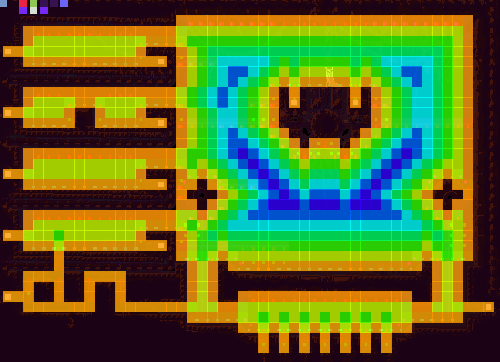
Another thing I did which has been a long time coming was implementing a terrain proximity map in the common AI map:


Any flying creature will be very thankful to have this info, as it allows it to know what's open air and what's uncomfortable tight spaces. Also, if we want to add a creature bigger than 1 tile wide, this allows that creature to know where it can move.


Here's a dead end map for the fly with a preference to stay away from walls, looks pretty reasonable for a fleeing behavior for a flying creature right? Given that those bottom two corridors are room exits, otherwise it shouldn't have anything to do down there.


   jamesprimate on September 14, 2014, 01:23:57 AM:

I had a chance to play this game briefly at BostonFIG. It looks as incredible in person as the GIFs we've been seeing. I must admit, I felt like I was terrible at playing it. I'm excited to spend more time playing it when it comes out and getting a chance to learn to play it better! Very cool!

yo! was nice meeting you! thanks for stopping by and hanging out

TIG was pretty well represented at BostonFIG. i think i met more forum people there then all PAXs combined. i guess that makes sense with the indie game focus, but still seems surprising considering how much smaller it is.

on a similar note, the RW booth was NUTS. we had a crowd for 8hrs straight doing constant 4 player matches. Its possible we had more people playing it in one day at BFIG than 4 days at PAX Prime. and that was with the most slap-dash, ghetto "booth" setup possible  Tongue


   JLJac on September 14, 2014, 04:08:59 PM (Last Edit: September 14, 2014, 04:33:04 PM):

Hi!

I usually don't work in the weekend, as I think a five day week is probably the better option in the long run, but this time I made an exception and did some polishing on the dead end mapper. Now it works like I originally intended it to - actually finding loops, and from every loop drawing a connection to every exit. Tonight when I do my actual update I'll throw an image of the slightly improved dead end mapper in there.

@ Sebioff, Jimbert, thanks! Just needed a reality check. I might as well implement those solutions then, if something like a million integers isn't necessarily a problem. I have been looking into Sparse Arrays some, as I think I could use something like that for the heat maps where the great majority of the level is just blacked out, but from how I understand it there's no way to get the smaller memory size without trading it for a more complex look-up process. And you guys have told me that if I'm in a situation where I have to choose between burdening the processor or the memory, I should go with the memory - so in that case it seems unnecessary to go out of my way to go against that advice.

I had a chance to play this game briefly at BostonFIG. It looks as incredible in person as the GIFs we've been seeing. I must admit, I felt like I was terrible at playing it. I'm excited to spend more time playing it when it comes out and getting a chance to learn to play it better! Very cool!
Thanks for dropping by! Sorry I couldn't make it this time haha! One fairly common complaint with the game that I remember from PAX was that the controls were difficult... So you're probably not terrible, it's just that the controls aren't as streamlined as they should yet. Some people learnt the controls intuitively while some where struggling with them, so we probably need to find some kind of common ground between all users here. I for one have been playing with these exact controls for three years now, so I'm way too used to them to be able to evaluate them properly - I think that when we get down to streamlining the user experience we'll have to bring in a few people who haven't played the game before and watch them play to see what problems they encounter. Anyhow, glad you liked it!

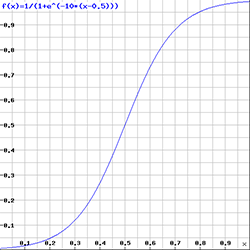
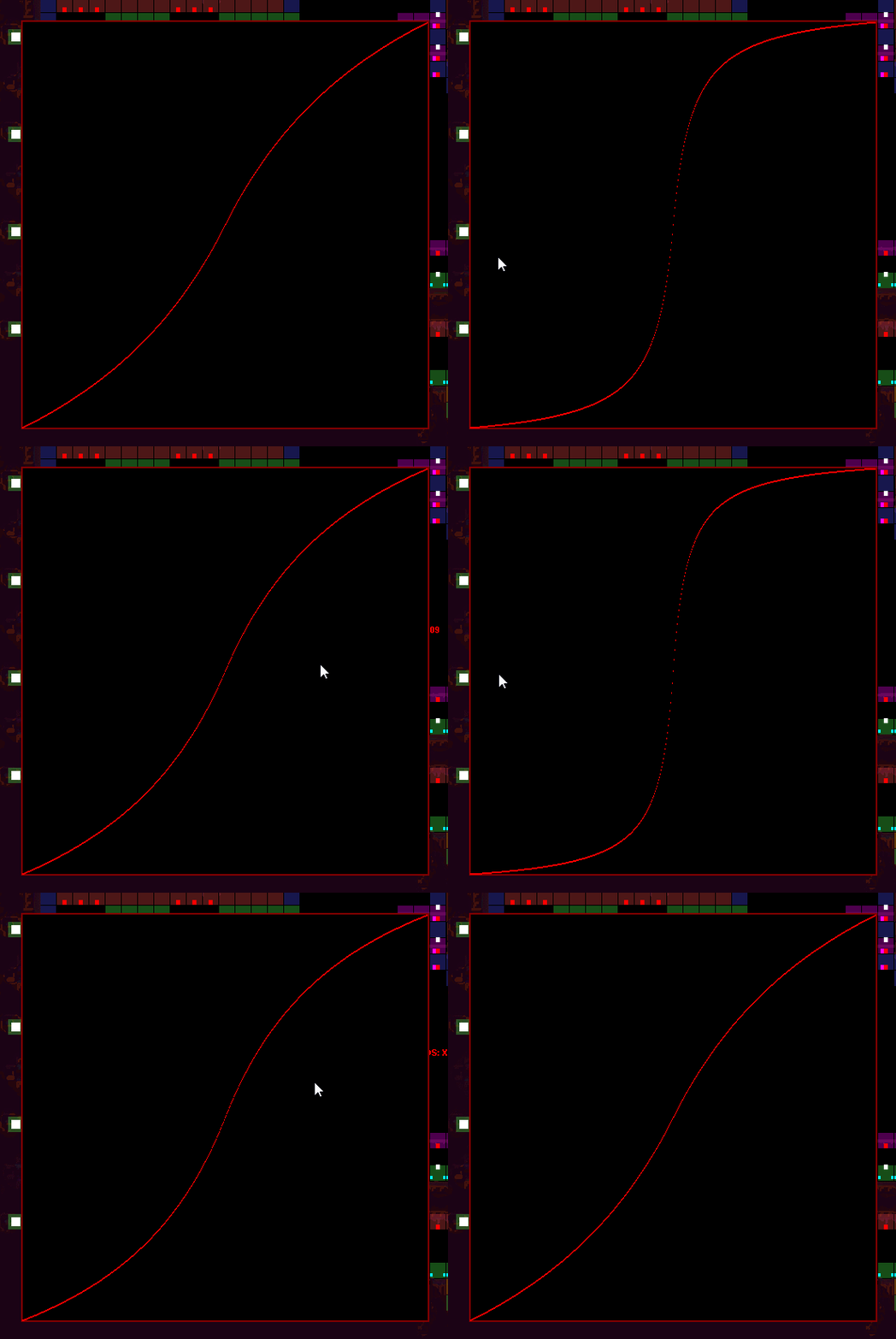
This curve:


is there a way to get a curve like this that fits snugly in a 1*1 square? I want 0<X<1 and 0<Y<1, and I want f(0) = 0 and f(1) = 1, but no X other than 0 should produce an Y of zero, and the same with 1. In english, the graph should hit the corners of the square perfectly. The one pictured actually doesn't hit the corners, if you change the steepness of it the graph will break out of the square elsewhere.

Edit: Yay! http://dinodini.wordpress.com/2010/04/05/normalized-tunable-sigmoid-functions/
It actually really isn't a sigmoid I think, as it doesn't have e^-x, but it fulfills the same purpose.


   JLJac on September 15, 2014, 02:55:30 AM:

Update 307
I spent the day trying to accomplish serialization of a class, as that was going to be a time saver I believed  Cheesy Serialization is basically that an object is converted to text (which can be stored in a text file, for example) and then converted back to an object again. My idea here was that I was going to save the AI maps like that. After having broken my game pretty badly it became more about trying to patch it back together again, something which was made harder by not being able to make visual studio break at exceptions, and... Yeah you get it!

The end result was that I actually managed to make the serializer spit out some text, but way less than what could possibly contain the data I was trying to store (just the names of the classes I was serializing, basically. And some.... web url!? Idk.) To serialize an object I also have to adapt in a lot of wonky ways, like having an empty constructor etc. Also, all objects that are stored in the serializable object also have to be serializable... Basically, at the end of the day, I think it's going to be more efficient for me to just make my own method for converting my data to text and back again. Also, that way I will positively know that it's not storing something I didn't ask it to, such as strange web URLs and the like.

The only problem I can see is that I need to store some floats. Integers will become 1, 2, 3 or 4 ascii characters, which is kind of wasteful with space but still within the realm of the reasonable. For floats however, if I want to save them with somewhat good granularity, I have to use like 6 characters for each, which seems horribly wasteful compared to the fact that a float is actually no bigger than an int in raw data.

Does anyone know of any cool ways of converting ints and floats to ascii text that isn't horribly wasteful? Maybe you could make a huge BitArray, feed it all the ints or floats or whatever, then cut it up in pieces of however many bits make up an ascii character and just put that character in the text file? That would surely be using the space to 100%, right?

A pretty frustrating day. It never cheers me up when what I'm fighting with isn't an actual logical problem, but the functionality created by the microsoft people - all due respect though, everything they've made that's streamlined and easy to use I obviously never even notice. The day wasn't all bad though. I did get some pretty nice restructuring done when it comes to "preprocessing" levels, ie finding out AI information about them and saving that to the text files. Also I solved the curve problem of this morning, and made a curve visualization tool that I'm going to have a lot of use for in the future:


Over and out!


   JLJac on September 15, 2014, 04:31:17 AM:

Hm, I've managed to translate float arrays to characters bit by bit... It doesn't become ascii though, but unicode.

Look at this insanity:
Quote
饕䲟㌵䮈綷䲫᠄䲇휕䰍ൣ䱷䚼䲘⧓䯅蠄䬌೎䨷쫿䲆쇿䥙ꌂ䲫騨䱌䱃⦏䮌萕䱀떵䱹ꮛ䲶쬩䪎䮲海䲝땘䰠歐䱌䯒︇䲺䱽퍜䱊䲧⿹䬚躨䪋﾿䦬묄䬵䕫䲦��䰣궧䰍ꮋ䯭诺䨞憎䱑₏䱬䑈䱱璚䱞怒䬺欤䯿㉐䱽擀䲑㾇䲛ᷩ䲭诞䮈뜐䬆삇䱍졣䨆宴䦏횛䰹㑅䱙槥䱩筏䮜ꠢ䦉턚䲫敂䰥��䱄힩䦪ꏈ䲮ݺ䲠⒰䱠䃓䲎곀䰘옶䱲眶䫐ꌩ䰾撦䲟뼮䩏寧䨪亘䮘몗䱦Ꮺ䲟肎䲺곉䲶츴䰰믋䱘孃䲕硰䲹��䲋綹䱵䭌烋䰞쬖䲕㐹䱸䰹ષ䲹倣䲲ŭ䮛祂䲒弣䰜㶊䱙ᘤ䬂綍䱚⽁䰡伵䲫⯐䲋㩭䮼᢯䲼䀬䱩䲆竡䮏ﵽ䰱茚䯵谏䰼栏䲚ས䱸ẗ䱴켁䲟⊍䱞俴䰂쨩䲉⛎䲃秅䲼䲙슉䱱괹䪃䯎ᗆ䯇䯉籣䮇䱴伖䱠䱗ᒷ䛤툀䫸騔䮏ꨦ䰣뀫䱀仆䲌뷈䱕ꆳ䭈죹䱶፦䲛姈䰾⊽䲀ꚟ䢣塟䲔궼䱨禷䭝憣䱕藩䲜휹䮍爳䧚䰭蒺䲏︥䯧帚䱥캃䲏㊢䲺友䱁쒴䯹ꬾ䲸䧯ᣄ䬠袭䲻蝽䯩ㇽ䮷翛䨇㒃䯸켬䲑ᥫ䲝䯝腗䪔䓋䲋腐䮕ꋪ䰲覯䫍ԍ䰃졄䰒풃䲔죝䫼䊗䲂뵘䲍䲻덖䰼바䫀✞䲜釶䰯낈䮞䯏풺䱡䁶䲸䱜ﶨ䲡溴䧜峏䮤曬䯞䂷䱼ꁹ䲽똵䰤儈䯟씦䲃偟䯽䰓䮏䦛롩䲶㌔䲪⤃䱫쉔䲢嶮䲍컓䱌䬳렺䱸ᮍ䰍䪴䧛鿰䲄䯀팗䲢먙䲧侓䰠䰹㳔䰎櫯䲨㺜䲮䜣䯹䲷嫪䯵럥䲢䬱鏉䰯瞂䯒ႇ䱁ꑥ䲪㐤䮚罼䲢픚䱏㸶䲪꧴䰸馉䮬ᕻ䲶곟䲟ꄖ䯌��䲮餇䭞㌮䰶㫹䰢蒠䯠䰈譠䪓揤䮴蠪䲬壧䲴铅䩿ꁆ䲟晖䱁䲥窧䲾䨙䱩枊䰪❹䰄䰮蘈䯜��䲯稘䨌讅䨈쁢䰽癚䫏侌䯯ɴ䲘⋦䯴丐䲆ᫌ䭑蟒䲠圲䰔䋤䱫ꖅ䰋绑䲗题䮧샂䲵崤䩹凊䮌᤻䲦䫨䱓슷䲞Ⓞ䲐ᱠ䯵릥䥖筫䲐ꂟ䮘ᤏ䲄⟩䱡䷬䱏䰄䱚燜䲮ᔏ䩧襵䱺᳤䯚턳䰂⯤䱡푼䱲"䱆쿙䱈䫐䲅䲏ಪ䬞曋䲚軈䲩ৎ䱲䯵䰣⤆䲳襁䱦懦䨺春䯡ꮙ䮶꼟䰕국䭮곇䲲搣䱖��䰮윋䱵⻧䲟ᑱ䯈蓩䯄䱄僬䫋܂䱫俾䰅鏅䮅慐䰊䱵爿䲐妝䱞眄䰉춭䲰얜䰒ϰ䲉䭁抎䲼��䲴��䲈邷䬐蝔䮀䮰䲹趽䭂ᐳ䰁㥨䲁䮑჈䫾➾䰫顖䰧㨤䰔냒䫅䱜㺲䧵鬣䲼뤴䰢䬱辢䱍ꗅ䰱䟃䪊窤䲓䲝㨆䲚䓋䲈홵䭣쮹䰰ꦁ䫇燻䱳쎝䮩ﺸ䲸䲱��䲻䵠䱗ܽ䯫잔䰖꿶䯕䰉ึ䬈ߐ䱈섓䮇ꡝ䭱楢䲞헻䲘ẁ䲤㔔䬅㨂䣸ᵆ䰈東䲸臢䱅ꭹ䲞ᥤ䮳彡䱪��䬿砠䱬맏䱕ງ䲬バ䰻㤧䰺⠣䲱঻䲶᜜䬘锫䲠鵥䱃ፓ䭫鲫䲟Ⳅ䲵瀤䱴柊䩤ꢧ䯕鈫䯉��䯑僀䰵籏䬔��䰡僤䱊Ꝗ䨂贆䰚ᇬ䲋菌䨨嗠䯆봅䭹喊䮧鶍䱵纤䮁侚䰫橌䯄㕹䱝ᣏ䭦ퟵ䰟塣䭇谂䰖䯮ʑ䮵晸䲖��䱰��䲄ꮰ䰫勍䲋䱿갳䧫蹯䰳℄䮝꨷䯋䕿䬄陥䦫慢䧥ஊ䱡⦗䭠䓑䲾䯴¥䲠︧䲈뙴䲫歔䩶﫿䲻趼䲓쇖䯇䄏䲙敧䯱譅䰥賡䮹枂䪅ﵽ䮤䯽쒠䫚撔䮄��䮴䲥䰁빵䫐춊䫽邴䪂㮧䰡孂䫦��䯋ꈙ䰻䯗䯱䨳䱍쟇䩞鋰䲉䰦轟䰛퇗䲪钧䮘䘰䭃轋䮈﷭䰿ႅ䲀捑䲇䔏䨥芶䮷Ჸ䯷㵐䰇엞䲆䟸䯲シ䲍ᧂ䯟檣䲀뮀䱃搰䱝⇿䱋縎䮝姁䲸ꬕ䰫廓䱱ꓩ䱽퉖䰈寢䰃㇧䲄艬䱝䍰䱍쥪䲱茢䲲㔪䱀놿䬁僅䲥〴䲺醰䭆캆䲤栃䰟䲳ﭑ䰞귚䪯漉䯳ǰ䲍宠䲥˰䲌윱䫘᦯䭘䀚䰩鎥䭨W䮺ㄌ䰁廒䰕ᆀ䱏伆䱷⢀䮼岣䱩䬠錽䱧♷䱳爥䲐ᮣ䱌즐䰜誅䯍q䱹戼䲤䨆䥟䰰좿䲅቉䲖䧑䲧ࢁ䱁憄䯱꞉䱥㞕䨽ꭘ䲨巌䲪끵䬨ꀤ䰆餺䱌��䱠賦䧦㝴䰱ᘪ䲐଒䪐㋯䲘岫䲔䦚䲪৤䲖达䲦揃䲈胖䰝缘䩮硺䰋ꅮ䱉䮽䲜䯞䲒젨䦨ꚕ䰗��䣸纶䮁듐䮄뤦䱥Ⱇ䲇씅䮯땢䰽፠䱾旪䯆ȣ䲟渟䲠࿎䲑懚䲢ݑ䯱曠䨡ೡ䰁訥䪀噀䪚罻䲦颞䭣꠨䲨⏰䱢닸䡥쮷䰕츼䲨粈䲅쪶䱀嬎䭵鴀䬶ꌚ䲩쨱䬜霚䲆ѵ䱦翺䲘䲠嫎䱐䰟媲䮬䥲䱑䲲鷋䲤��䲓胶䲒쀁䯃崩䬛苩䯝鐍䲗蓢䬒搩䲇䫼䱈嚢䰴소䨟䲮栿䲥▓䭽陔䭷萐䲽ず䩵ନ䲓ꨆ䦼㝀䰦铚䲢೫䰒��䲳⃘䲱쮅䲺挤䱥邕䲙뫤䲊敊䯨쥤䲭Ἁ䰫咮䮯m䲖렝䲞䨃䱒ᇞ䱰뫈䰓똥䲡䱱㪷䥤앋䲭ߴ䰾卅䲞텷䲯ฤ䪽ꎈ䮱쪹䤸ȿ䮙䜶䬡ඟ䲛㦜䯎츧䮾䰢䬞㏰䯵怂䰳顥䰀炭䱉ꂲ䰍Ɠ䮘졫䮧疪䲕梾䲎꒏䱁ᠵ䲍䯻ޞ䲜इ䬹��䪯꣨䱪闫䲭휵䲲쳣䰴ḣ䲢轶䯷均䲙ꐦ䲴茕䱞厺䱯덴䮇ꯑ䰢ٓ䰩䧞䰏彖䪘䬑뮲䲒ᛡ䲫᠝䲙摣䲯뮇䰬莋䯂ᄇ䱰ꓤ䮋졮䮚璋䮆팣䲟퉀䲸嬊䲄פֿ䲹獳䲨軭䲩䨘䯟㯻䲌⾴䬄Ჶ䲱圥䮧纆䲷㒈䱨헐䱇ᎊ䱠슚䲺㙺䰒֝䮶焨䮔︋䲍읝䰏䰽ﳡ䰮餩䰭䯯慢䫥␺䲯ᱢ䱔✉䱲↪䲘蕝䬧㼚䮾摩䲺鲌䲑䱺崽䲸竐䲐쁅䲀꽦䫖㺳䰼Ꟃ䲘隟䱐姕䲕皢䮛䀓䰯鮘䫜◧䫽��䲣⍌䯐魦䰒䞍䲺詿䲖訨䯬茋䯗奷䯌૸䩪좢䦶롽䮗䲍ⓧ䲻ᮞ䰱舖䰁ὥ䲱緵䲹䱒䣱䫬좈䢄鳪䯰ꃭ䱋狊䬓씳䭶㥆䱸₹䱍斧䰷礏䯍䭪��䰡굴䱛術䱦嵯䰃逢䱼淘䲦翍䲬ῒ䰉Ά䰃䲷ퟆ䱞ጓ䮉椱䲼ꇣ䲐䮐ꖓ䲫览䯭凈䰮糏䲷猼䮚쭝䲫䲀㌲䫁劙䲣魟䰥㍲䲪ꀫ䱘Ⓦ䬚䲔ز䬜쇌䰋䲙欅䲦떥䲚ᚷ䯜狇䲼恽䦾ꆭ䲏䲡殾䬲ꃢ䱧ዏ䮌뱅䲔诺䲞棣䲴䨥鉺䯩噑䱛գ䭸箬䱠苖䲳ᴃ䲊☥䱣ꖆ䭘䢮䯝ꥂ䲴⥾䪥䫥ᣞ䮥␌䯏臏䮉ꢙ䲛㉍䮴뢳䯒ᤱ䲂㫋䲈䮩躯䮾썱䧩햇䰃䩪㸭䮑쟊䭼莖䰊崣䲃娫䬨ꈉ䲽ᜲ䲟㫏䰖汕䫚ꚯ䲐둥䱰掍䲕쑭䲨ൊ

If nothing else it's a somewhat interesting display of what languages have a lot of signs hahaha! This is generated from random floats. The vast majority seems to be Chinese and Japanese, which makes sense. There's quite a bit of Korean in there as well, but as Korean is a phonetic alphabet (although you group the letters together in compounds of 2-4) it's a lot less. Soooooometimes you see a roman or Cyrillic character in there.

Huh. Pretty cool. Just not sure if I can actually store my data like this. It does seem to be re-convertible, if I ask for random floats back from the string-to-float method they're aligned. But it doesn't feel very safe if this game is supposed to be compatible with many different platforms. Also I read somewhere that some computers arrange their bits in the opposite direction, in which case the data will be totally jumbled.

I should probably just do the actual serialization haha  Who, Me?


   JLJac on September 16, 2014, 02:39:45 AM:

Update 308
There was a thing called Convert.ToBase64String which makes bit arrays into strings that are (from how I understand it) dense information-wise, and using that I finally managed to save my AI maps to the level files and load them again. These strings keep to ASCII characters and look a lot less menacing.

I have also created infra structure for checking that all levels are up to date upon starting the game, and if not doing the AI map calculation on them and saving the results to the level file. When the level is then loaded it'll unpack and use that info. This part took a bit of fiddling, as when the level is loaded to generate the AI map it shouldn't load the (non-existent or out-of-date) AI map, and when it's later loaded for real it should wait to apply the AI map, as it needs to generate some parameters from the level geometry before it can apply the AI data.

So yesterday's problems are solved! Instead a few others, more harmless ones have popped up. The dijkstra maps don't look perfect and probably need some messing with, and the thing that maps the distance between every exit and every other exit isn't plugged in and tried out yet. But the basics of pre-generated AI data is in! Yay!

In less happy news James told me that Gimym JIMBERT is apparently taking a pause from tigsource! D: This means that Project Rain World will have to do without its main developer for a while, I will however do my best to step up and fill the position myself. Thank you a million times for all the useful help, I wouldn't be half as far without it! Come back soon! 
Hand Thumbs Up Left Crazy Hand Thumbs Up Right  Hand Shake Left Tears of Joy Hand Shake Right


   jamesprimate on September 16, 2014, 06:36:15 AM:

deep sighs of relief were heard all across the globe!


   JLJac on September 16, 2014, 10:39:44 PM:

*phew* Who, Me?

Update 309
Finally I think that everything having to do with AI data being saved to level files is DONE! For each creature (or rather for each "pathing template", some creatures share the same pathing data as their movement is similar) there are now several AI heatmaps that can easily be accessed. One of those is the dead end map, and then there is a dijkstra map for each room exit.
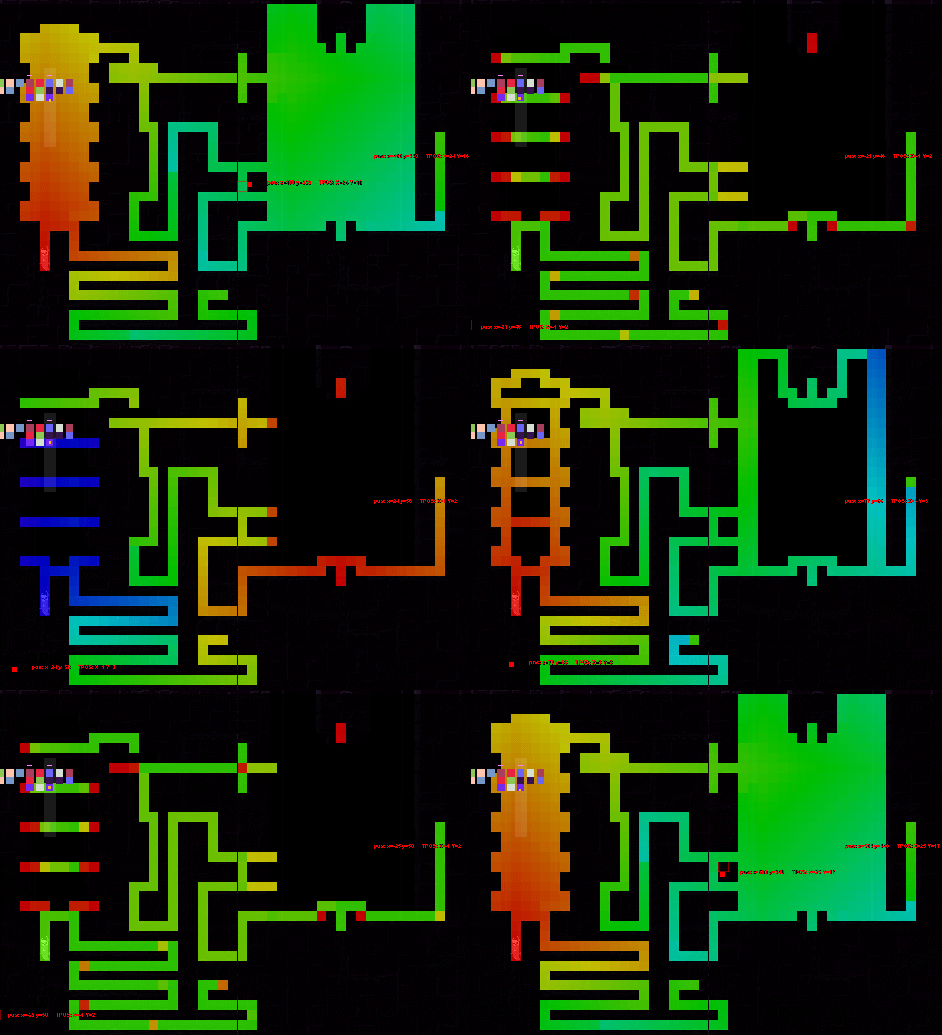


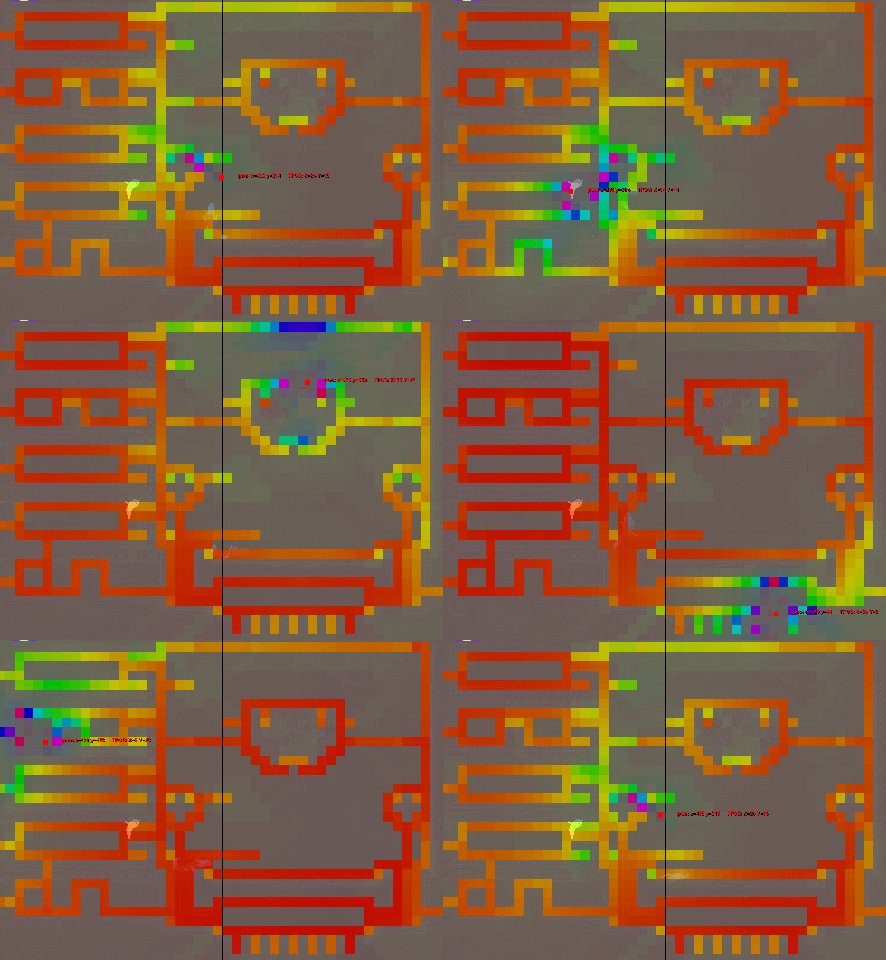
Here's a visualization where I can look at the different AI maps for all the different creatures by moving the mouse around. The ones with little blinking dots are the dead end maps, and the blinking dots are the hub spots or fleeing targets. Saving those to the file was kind of a hassle as well, until I figured out I could just shift the float upwards with 2. (Shifting it with 1 would be risky as the range is 0..1 and then it wouldn't know the difference between an actual 1 and a 0 that had been shifted.)

This means that theoretically creatures could move around between exits with no path finding at all, just by following the dijsktra maps. In practice there are other things playing a role as well, such as the Obstacle Tracker, so most of the more intelligent creatures will still need to do actual path finding. For small, stupid, swarming creatures it could definitely be used though, enabling what looks like intelligent behavior with pretty much 0 strain on the processor.

What most creatures will be able to use the maps for, however, is having a better general understanding about where they (and stuff they interact with) are in space. Which exit am I closest to? Which exit am I closer to than any other creature? Considering a group of creatures, towards which exit do they gravitate?

I have this one idea though, let me share it with you and tell me what you think. The idea is that the dijkstra maps could be used as beacons for triangulation of distances between arbitrary points on the level. What I'm talking about here is not distance as in straight distance, which is easy, but actual pathing distance with the terrain counted in. If you are close to another place in coordinates but it takes a huge detour to get there, that detour distance is pretty much the only thing that's relevant, right? I'm thinking about this especially in terms of being afraid of other creatures, when fleeing it is very relevant information how close the threat actually is in terms of time to get to you, rather than mathematical shortest distance.

I think the triangulation technique could create pretty decent estimations for these non-direct distances. To get the exact distance you'd need pathing, but this technique is probably at least 10 000 times quicker in most cases, and will hopefully produce acceptable results.

Ok, so take a look at this. Here's a dijkstra map for each exit, and I'm trying to triangulate the distance between A and B. The data I have access to is the distance between those points and each exit.
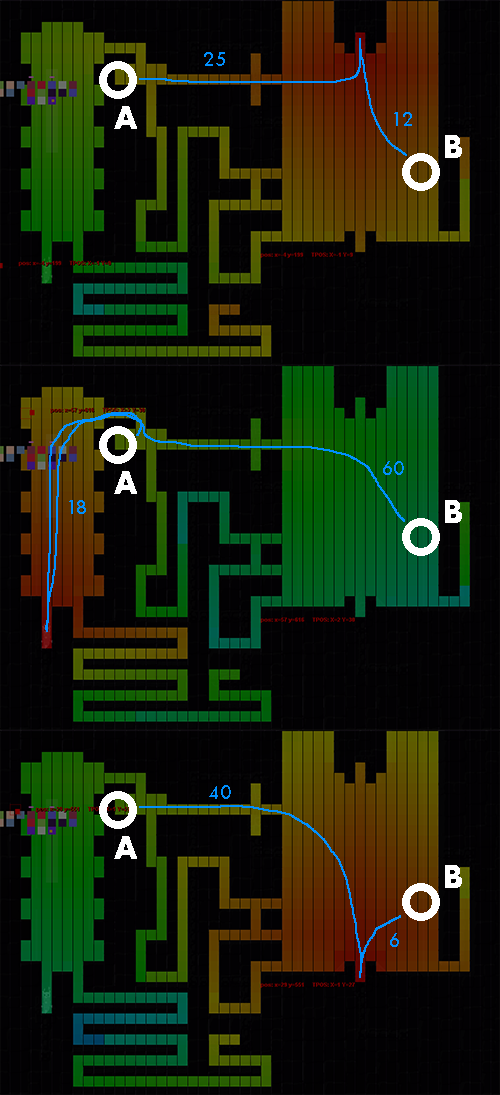


So what I'd do here is basically imagine each map as a dimension. For the first dimension, then, A is at 25 and B is at 12. That makes our delta in that dimension 13.

ABS(25 - 12) = 13
ABS(18 - 60) = 42
ABS(40 - 6) = 34

(No I didn't count tiles, the numbers are just invented)

These distances in "triangulation space" can tell us some stuff. If we only have one dimension, we can't know very much, because there are many tiles on the map that are exactly 12 tiles away from a specific exit, and they are not necessarily close to each other. E.g 12 tiles to the left of the exit and 12 tiles to the right of the exit. If we have more dimensions to play with though, I think the triangulation would quickly become more reliable. At three dijkstra maps my estimation is that it would be extremely uncommon for two tiles to have the same combination of distances to all exits, making the coordinates in "triangulation space" pretty reliable in their relationships to other coordinates. Correct me if I'm wrong here!

The system could potentially give a "false close", but never a "false far". An example of a "false close" would be if you have a room with an obstacle in the middle and an exit at the north and the south of the obstacle. A point to the west of the obstacle could have the same distance to both exits as a point to the east of the obstacle, making them appear identical or close in "triangulation space". An asymmetric placement of the exits, or a third exit, would help with that though.

A "false far" can never happen, because if the points are separated in any of the "triangulation space" dimensions, they are at least as separated in actual travel tiles as well. Look at A and B in the third picture above - the absolutely closest they could be while having the distances 40 and 6 would be if B was 6 tiles up on the same path as A, and then they'd still be 34 tiles separated.

Another way to say this is that if the deltas in all "triangulation dimensions" is 0, A and B might or might not be on the same tile, but if any dimension has a delta larger than zero, A and B are sure to not be on the same tile.

The fact that the system might give a "false close" but never a "false far" probably means that of the three deltas calculated in the example above, you should pick the biggest one, and conclude that the actual distance can be no larger than that.

I think this makes it fitting for fleeing behavior. These distances could be used to evaluate how nervous a creature should be about another creature, and whether it's time to calm down and stop the fleeing behavior. "False close" isn't too bad in this scenario, because better safe than sorry, right?

Also it will be cool to check out how this can be used in swarming behaviors. Maybe you could even create some strange kind of dynamic path finding using it, if you move towards whichever neighboring tile is the closest to your goal in triangulation space rather than in actual space.

Oh, when I read through my post before hitting the button I had a small epiphany! One way to further eliminate "false close" could be to add the mathematical straight distance between A and B and treat it exactly like one of the triangulation dimensions! It has the exact same properties - ie that A and B can't be closer than that, so it would work really well as a last reality check, eliminating for example the "obstacle in the middle and symmetrical exits on each side" problem. Shortcuts messes this up a little bit as they make it possible for tiles to be "closer than they actually are", so maybe it shouldn't be relied upon too much. But shortcut travel still takes some time, so it could be counted in to some degree...



   JLJac on September 16, 2014, 11:33:40 PM:

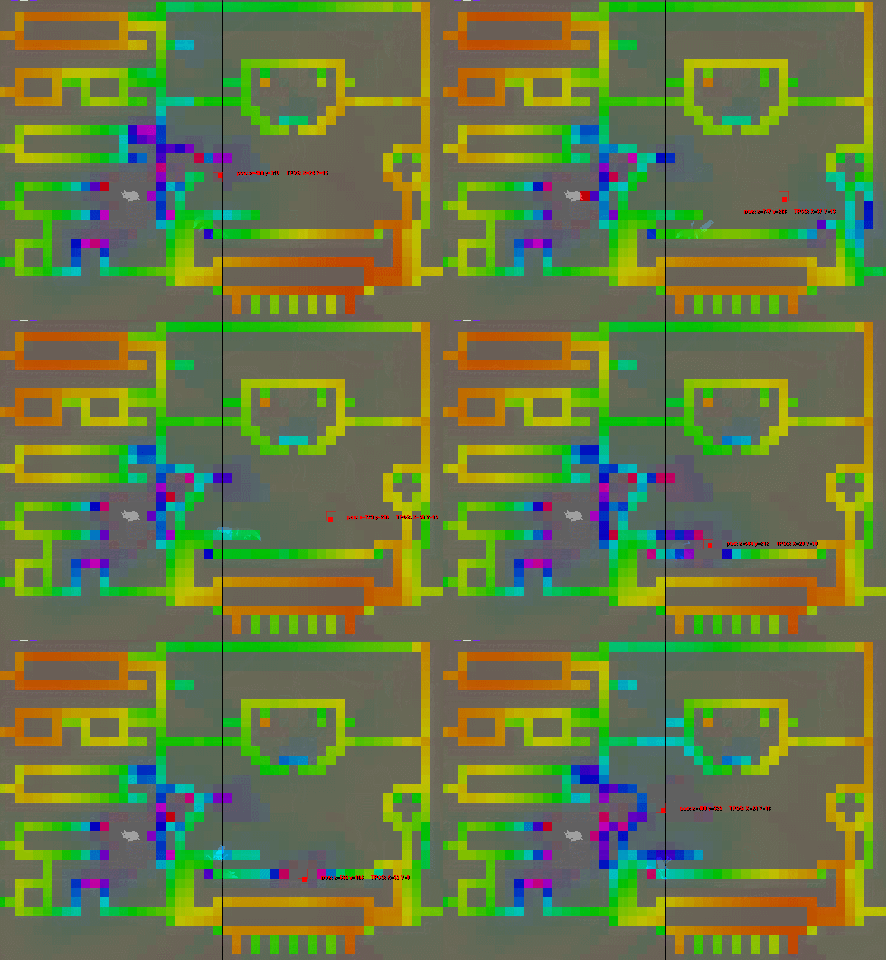
Dijkstra map triangulation looking pretty good!


The color of each tile is how far that tile is estimated to be from the mouse pointer. It uses the largest distance it can find.

I have a bit of a heuristic approach here, where the it counts 1/3 of the straight line distance as one of the dimensions, meaning that straight line distance is accounted for, but not taken quite as seriously as the triangulation dimensions. This looks like a good balance to me, as if I didn't account for straight line distance at all it would display some pretty obvious weird artifacts and errors, but if I counted it in fully it would not leak through shortcuts at all.

Contrary to what I expected the algorithm does give some "false far" outcomes, in cases when all the exits are close to each other. This can be helped by giving the straight line distance more weight. I'm thinking though, maybe I shouldn't actually just pick the largest value - instead I could try to calculate the multidimensional diagonal in triangulation space?  Evil

It is pretty cool though! It gives an estimation of a dijkstra map between any two points that's decently accurate, and at 0 memory cost and 0 processing cost. The way to do this "properly" would be to move around a dijkstra map target every time it changes tile, do a complete flood fill, and save a huge grid of those values, just to throw it away on the next movement. Slow, weighty, and it couldn't really be done for more than a few moving entities. This system can estimate distances between all and any points on the fly! I do these calculations for every tile times every frame! With this system I could easily have 100 creatures asking for the distance to all 99 other creatures each frame, and it wouldn't even be a problem.

Gonna try my hands at those multi-dimensional diagonals now ...


   JLJac on September 16, 2014, 11:59:58 PM:

Yeah! These are actually far from perfect - if you look at the gif you might notice that there's some snapping going on at places. That's where one of the dijkstra maps approach the area from two different directions. Those tiles are considered far apart despite actually being close. The less dijkstra maps it has to work with and the closer they are the more stuff like that. But given the extreme benefits in speed and memory I think that's worth it by far. For AI's that are supposed to be a bit smarter you could maybe have a real dijkstra map being updated close to themselves or the threat they're avoiding, and then resort to the triangulation for the rest of the level.

Multidimensional diagonals worked out fine, the estimation looks a bit smoother. They're probably a bit slower as they have some exponents and a square root (it's actually just Pythagoras's theorem in n dimension) but that's still so vastly faster than creating actual dijkstra maps that it's not really anything to think about.

It will be interesting to see how the AI will be able to use this!


   JLJac on September 17, 2014, 03:14:47 PM:

That would be generating and following a dijkstra map - every tile knows its distance to a fixed origin point. The triangulation is about comparing multiple overlapping dijkstra maps to estimate the distance between any two arbitrary coordinates. This means that I can get an approximation of a dijkstra map for any point with just a few lines of code executed and no memory usage, contrary to executing the tens of thousands of lines of code necessary to generate an actual dijkstra map and save it to memory.


   JLJac on September 17, 2014, 03:38:08 PM:

Yep! The more baked maps, and the more apart their origins, the more accurate the triangulation becomes.

What the system doesn't account for however is one-way connections, as it's just comparing distances it doesn't know the difference between positive or negative distance, or what kind of connections the distances go through.


   JLJac on September 18, 2014, 01:18:26 AM:

Update 310
So I got some flight behavior up and running. The core mechanic is an engine that can identify a "threat level" for any given tile, like so:


Sorry about the coloration in these ones, it's a bit unintuitive as I didn't invert the hues. Red is less threatening, and blue is very threatening. The map is generated by a combination of straight distance and dijkstra triangulations.

The system supports many different threats which can be assigned separate severity. In this next gif there's one threat emitter assigned to the mouse pointer and another stationary - they tend to melt together if they get close.

The dead end map is consulted as well - you might notice how some tiles are always considered a bit threatening. Basically dead end tiles get a "bonus" on their threatening level.


The flight behavior consists of picking an (accessable) coordinate every frame, and comparing it to the current destination of the path finder. If the new point is less threatening than the last one, the new one is assigned. There's a 50% chance to evaluate one of the pre-baked "hub spots", otherwise it'll pick a coordinate from anywhere in the room. I'll also have it consider exits here later, making the creature able to flee from the room rather than just within it.

The path finder assigns a harsh cost to tiles that are considered threatening, meaning that the paths will take detours to avoid them. I have an exponential formula to this, making it almost impossible for it to path through a threat area.

Here's a blue lizard feeling very afraid of the mouse pointer.


The lizards are not good at crawling backwards, and avoid it for the most part, but if they have a nearby threat right in front of them they'll back up. This will activate a "panic mode", lasting a second or so, where they won't path to any specific target, but just move to whichever nearby tile is considered the least threatening.

The system is perhaps not perfect, but I think it's good enough for most purposes. The goal here isn't as much to create an actual super efficient fleeing behavior as it is to communicate that the creature is trying to escape. From a game fun perspective it is probably always more fun for a non-player entity to actually bite the grass rather than successfully getting away (Action happens! Something gets eaten! And it wasn't you!) so as long as the behavior doesn't look frustratingly stupid I'm happy with it. Now to contemplate what to do next... Flies?


   JLJac on September 19, 2014, 12:11:51 AM:

Haha yeah - I think it'll be pretty cool when you've been antagonized by those guys for a while to suddenly see them flee from either yourself when you've managed to hurt a few of them with a spear, or some larger creature hunting them.

Update 311
Spent the day cleaning up the fleeing behavior - I had stupidly been using just 2D coordinates throughout the entire system, making it unable to differentiate between rooms and making creatures potentially confused by threats in other rooms. Now it's using world coordinates, that have the room index specified.

Now the threat tracker can create a link to the creature tracker as well, which I didn't really have a framework for yesterday. This means that a creature can avoid another creature using its tracking data, and I can easily set up links like that when the AI is alerted that a new creature has been spotted. As the time since the threatening creature was seen increases, the threat will decrease accordingly, until it's forgotten altogether.

Also enabled fleeing between rooms. If a fleeing creature realizes that there's an exit with no threats blocking it, it might just leave.

Have a nice weekend! Here's a gif of Reverse Rain World!


   JLJac on September 22, 2014, 03:34:11 AM:

Update 312
Some pretty interesting parts have started moving into place today. First and foremost, a framework for relationships between species. A relationship is a one-way link between one Creature Template and another, consisting of a type enumerator and a float signifying intensity. Currently I have Ignore, Eat, Afraid as possible relationship types, but there are endless possibilities such as AggressiveRivalry, Annoyed, Symbiotic, KillForFun, Cautious, Territorial, and so on. These are the threads that will hold this food web together.

As you might remember the Creature Templates have some inheritance between them - for example there exists a Lizard template that's never incarnated on a level, but which is an ancestor of all the lizard breeds. I've set the relationship system up to flow down through the inheritance tree, and overlap empty ("Ignore") relationships but never specifically declared relationships. I'll have you know that I did this with a recursive method! (On declaring a relationship, check all children if they have any relationship to the relationshipee, if not, call the method again but on the child! I only got stack overflow exceptions 5 times setting it up!)

This means that I can first declare that all lizards should eat slugcats and ignore each other, by addressing the ancestor Lizard object. Then I can create exceptions, like making Green lizards hunt Blue lizards, making Pinks aggressive towards each other, or deciding that Greens should actually run away from slugcats rather than hunt them.

The really cool part about today though is that I've been able to start hooking the AI components to some behavior. Everything was pretty much in place already, so it was very easy to make the lizards actually react to other creatures. As I had planned, it seems like I can create lizard behavior with very little code in the actual lizard AI, as almost everything is outsourced to the different modules.

So for example there is a Threat Tracker, right? And from today a Prey Tracker as well. The general AI already has a method that is "a creature has been spotted". So what the lizard AI does is that each time it gets notified about a new creature it checks with the Creature Template Relationships: if the alien creature is prey, it notifies the Prey Tracker - if it's a threat, the Threat Tracker is notified.

These modules are then pretty much autonomous, they run their own behaviors alongside the main AI, keeping track of threats and potential prey respectively. Every frame the main AI can ask them, however, for a status report. The Threat Tracker can be asked for a threat level 0-1, and the Prey Tracker can similarly be asked how it estimates the chances of catching its most attractive prey within the next few frames.

Using these values, the main AI can do a utility based decision - what's more urgent? If the threat tracker tells me that I'm actually in danger here, perhaps I should activate the Fleeing behavior? The idea here is that these values should be weighted when compared, for example a threat level of 0.3 might be more important than an estimation from the Prey Tracker at 0.7, as self-preservation should be prioritized. Later when more elements are in, the threat of rain could perhaps overshadow the threat of another creature, etc.

So say that the utility check decides that the current threat level is the most urgent issue - in that case the fleeing behavior is activated. When the fleeing behavior runs, the main AI once again turns to the Threat Tracker, this time asking for specific details on where to run. The Threat Tracker then does its calculations and returns a flight path, while the Prey Tracker can be more passive this particular frame.

Then there's of course talk between the modules, all of which is moderated by the main AI. For example the Path Finder will ask the main AI about each tile it handles, whether or not the main AI wants to add some path finding cost to that particular tile. The main AI will then ask other modules, such as the Obstacle Tracker or Threat Tracker, and for example return higher costs to tiles that are perceived as more threatening.

It all seems to work! A hunter/prey relationship between Green and Blue lizards makes one pursue the other, but both still hunt the player on opportunity, for example. It's a lot of fun to be able to switch these relationships on an off at a whim. Right now there's no real interactions in yet, so they can't bite each other or the like, but it's still fun to watch them react to each other.

What's fun about the AI system is that it seems I have somewhat been able to separate the more technical stuff from the design stuff - out in the modules calculations are done, while in the main AI there are only a few lines of code, but those lines are creative content rather than technical solutions. Using the modules I can quickly and cleanly create behavior that conveys personality, such as cowardice or brute force, rather than solving a lot of technical problems. I'm much looking forward to creating more creatures within this framework!

All of this is very hardcoded and crude as is, but I soon hope to be able to show you some more sophisticated stuff.


   jamesprimate on September 22, 2014, 06:12:59 PM:

KillForFun

joar turning the brutality up to 12