—    —  Home

   JLJac on March 27, 2014, 12:52:48 AM:

Wow, that looks high tech  Shocked
I just solved it actually, using IFormatter and FileStream - I got the solution from the c# documentation. And yeah, the levels are totally small! With this solution you just have to mark the classes involved in the serialization as [Serializable] and then it just magically takes care of everything :D It packages the instances(in my case of the Tile class) somehow and stores them in the file, and then it unpacks them into living instances just as easily. And yeah, the file size is super small!

But I'm pretty sure it would be even smaller if I did it your way... Well, this wasn't what I was supposed to be doing anyway - I was supposed to tweak the wall gliding, and was fed up with having to rebuild a wall to glide against each time I changed something haha!


   JLJac on March 29, 2014, 02:58:21 PM:

Thanks everyone!

Collision is all home brewn code, like everything else in the game except sprite handling, where I use the excellent Futile framework. It's strictly tile based for terrain and radius/trigonometry based for creatures, simple as that.

Yeah, I know I need to watch out for backwards conmability... Ran into that issue a few times with the old level editor. This time around I don't think it'll be as big of a problem though, as the game will not evolve as much during the process since it's already designed.


   jamesprimate on April 09, 2014, 01:59:46 PM:

Somehow I feel a kind of brotherhood with Rain World now... (I'm making the other debut Adult Swim game at PAX, Oblitus).

I was super excited when they told me they were publishing Rain World--I've been following this devlog for quite a while before then :D

oh definitely a brotherhood!  I'm good friends with roger hicks, and you guys do so much stuff together that I almost feel like I know you by proxy haha. when Steve mentioned you and oblitus in PAX conversation I was totally stoked :D

and thank all you guys for the kind words! Joar will be doing a bigger write up once his jet-lag wears off


   JLJac on April 10, 2014, 06:54:33 AM:

Hi there!

Just wanted say that I've flown over to Boston, and we're going to be at PAX tomorrow! Also we have big news: we're going to be published by adult swim games! :D
We're going to appear in their booth during the convention, so feel free to come by and have a chat with us.

Preparing for this stuff has been the reason it's been quiet here for a while, we didn't want to announce anything before we knew for sure. But now everything is settled, I'm trying to get my sleep cycle aligned to the american daylight cycle, and James is telling me epic tales of PAXes past. This is going to be a lot of fun! See you tomorrow Smiley


   jamesprimate on April 10, 2014, 09:02:23 AM:

nope! just a hacked together widescreen version of the lingo build. AKA still pretty alpha and rough. BUT, still a lot of tun :D


   jamesprimate on April 10, 2014, 09:54:31 AM:

yes! thanks for reminding me actually


   jamesprimate on April 11, 2014, 03:45:12 PM:

James, I loved you in Grandmas Boy.


   jamesprimate on April 11, 2014, 04:31:56 PM:

How long were you guys streaming? I checked in at 3:30 and then it ended like 10 minutes later. Did see some of the gameplay, looking great as usual

Do you have plans to do more backer Twitch streams after PAX? 

thanks for the kind words guys!

to be honest i have no idea how long we were streaming. the whole thing was crazy rushed and we were dead tired, so it could have been 10 minutes or an hour we probably wouldnt have noticed the difference. "Man" from MANvsGAME (the interviewer) was super nice though! but those headphones were like medieval torture devices

I think we'd totally be into doing some more streams, but like... once we actually have cool stuff to show from the new build. give us a few months!


   jamesprimate on April 16, 2014, 07:42:35 AM:

Thanks for posting the vids Christian! There are a few more out there in internet land, but i think those were the best.

Joar is off to NYC to explore for the next few days, so I figure its good time for a POST PAX EAST FLUFF POST!

Quick PAX post-mort:

It was a fun, exhausting, chaotic experience, but a very very good one. Even though we were showing an early alpha build, the reception was fantastic and we really couldn't have hoped for better. There were people that would come back every day to play for a few hours(!), and once we set up the 4 player "party mode", there was a constant crowd and it was a lot of fun.

Not to say it went off without a hitch though. Since we were still showing the Lingo build, there were a LOT of "duct-tape solutions" and hacked together last minute fixes. The expected PCs didnt arrive, and so Thursday night was spent frantically re-coding bits and pieces to get the aspect ratio to fit the screens of the replacements. There were some very strange framerate slowdowns that seemed to be related to the number of USB controllers attached, but then when the USB hub was attached for 4 player it magically went away, so who knows!

The enthusiasm for the multiplayer really gave us some things to consider. Recently we had just been thinking of it as a freebie game mode to add on top of the "real game" narrative/campaign part (in hindsight, probably just because we were bored of it), but new players were all excited for a samurai gunn / super smash brothers-esque party game, so we have talked a lot about it and will definitely be exploring ways we can enhance that aspect as well, perhaps even having the story mode feed into it some how (i hesitate to call the campaign "single player mode" because we really want co-op as well) Anyway, you get the idea.


If you are interested in seeing some pics from Our Big PAX Adventure (if not, plz ignore the facebook slideshow nature of this post, we will return to regularly scheduled programming shortly)


Rain World on the big screen
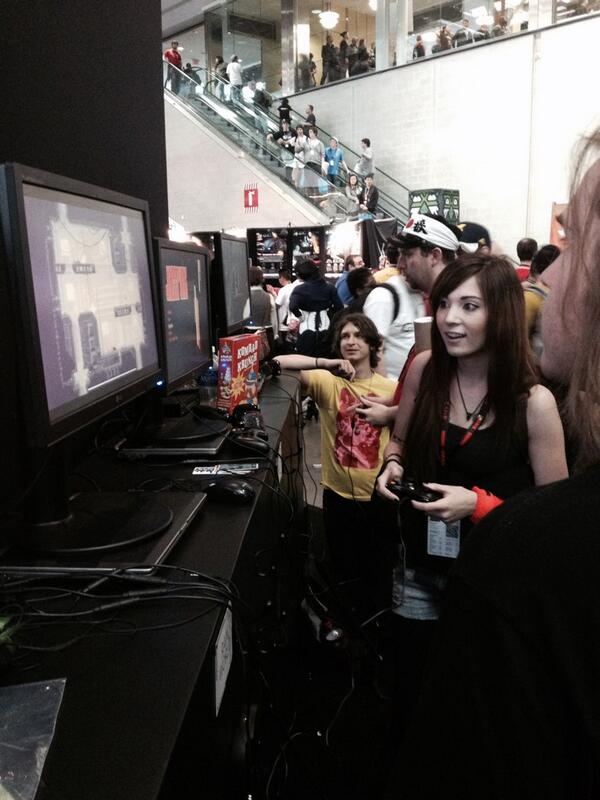


the very first 4 player Rain World match ever! sooooo fun! a fan played 2 player the first day )the PC at the booth only had 2 USBs), then went home and brought back a multi USB hub so we could set up 4player for the rest of the weekend :O now thats dedication! (Thanks Carson!!!)


stickers for players who could survive longer than 40 seconds


twitch stream with MANvsGAME


with jonathan from destructoid


Joar hanging out with Luis from Jazzpunk



on the BIIIIIG screen. not going to lie, that was a little scary. 7 second match obviously hahaha



   JLJac on April 22, 2014, 10:55:04 PM:

Update 226
And so I'm finally back at it! Started working on the engine for short cuts. This is a core element of the game, the thing that enables a creature to crawl into a hole and then pop out of another hole, somewhere else on the level or on another level. Essentially it's going to be the same, except that this time around the game will not recognize a creature inside a short cut as being in any specific room. The creature will exist, but as floating in some kind of limbo between rooms, to be assigned a new room as the short cut spits it out.

This is meant to further de-emphasize the rooms as cardinal containers for events. If you can move between rooms as effortlessly, and with the same code, as you move within them, I hope that'll increase the impression of an interconnected world. Also, de-attaching a creature from any room while it's in a shortcut prohibits it from weird interactions with other objects while it's in shortcut mode.


   JLJac on April 23, 2014, 04:04:47 AM:

Quick question to you wizards out there: can I do parallax scrolling as a shader? That is, can I feed a shader some parameters (camera position) on every draw command? Can I use shaders to apply different palettes to the same sprite, do color cycling etc?

Or has I completely misunderstood what a shader does? Tongue

Oh, if someone had some kind of beginners guide to the stuff, that would be awesome too!


   JLJac on April 24, 2014, 01:14:38 AM:

Thanks guys! This looks really promising! Anyone have a good starting point when it comes to the actual code syntax?

Update 227
We have working short cuts! A creature can go into a hole in one place and pop out in another. When in the shortcut, the creature is completely detached from all rooms, which means that no camera is viewing it and its sprites will be discarded. I don't quite know yet if this is a good idea. It doesn't feel like the best possible optimization to delete all sprites of a creature and then recreate them just because that creature isn't visible for 2 seconds... But I'll handle that problem when it becomes a problem. Trying hard with the premature optimization avoidance here, it's so tempting to try to make everything perfect now that I have the chance to recode the entire thing!


   jamesprimate on April 24, 2014, 10:06:24 AM:

you the man Gimym!


   JLJac on April 25, 2014, 04:23:00 AM:

Thank you soooo much!  Grin

Update 228
I realize that as I'm converting the game to c#, the devlog might be less than exciting for long time readers, as most of the stuff will be old news so to speak. But I'll just go ahead and type down what's going on, regardless of the entertainment value Tongue This is a record of the development process rather than anything else, and perhaps the goal of it is to be helpful rather than entertaining. Also it's a good resource for James and I, to have our progress logged somewhere. This time though, I'll spice it up with being even more technical  Evil

Multiple rooms are in! It went surprisingly easily, as happens once in a looong while when programming. I had laid some ground work, but it was still smoother than expected. Rooms are instances of a room class, and on creation they're passed a name. They'll go look for a text file with the same name in a "Levels" folder, and get their data from there. I've written a little thing that can translate level architecture into text and back.

Then we have a tile property which is an "exit", which can be hooked up to a shortcut. The game has a world map, which is essentially an array of level names and what other levels they connect to. If a creature pops into a shortcut and encounters an "exit" tile, the world map is asked about to which other room this exit leads, and the shortcut continues transporting the creature in the new room. Then the little in-shortcut representation of the creature reaches the shortcut opening, and the actual physical creature is spawned.

As of now, all levels are loaded simultaneously. In the future, I want to create some kind of "lazy loading" system, which loads levels as you enter them, and unloads them a while after you've left them. That way non player creatures will be able to move about a bit on off-screen levels as well. We'll see exactly what this system will look like later on - either it could be a simple cap (max 5 levels loaded at a time, if more, unload the one that has been off-screen the longest) or something more complex (unload levels where creatures are dormant/dead earlier than levels where creatures are engaged in activities).

Lots of exciting stuff to do now! Almost can't decide what to start with!  Hand Thumbs Up Right Hand Thumbs Up Right Hand Thumbs Up Right


   JLJac on April 26, 2014, 09:32:18 PM:

I'm using Unity, but the game logic itself is just c#, so it's still not impossible to detach it from unity if we wanted to. As of now, it doesn't look like there would be any reason to though Smiley

Maybe the programming heavy stuff speaks to another (narrower) demographic - in either case our policy with this devlog has always been to just blurt out whatever is happening here, from graphic design on the logo to intricate technical issues, and that seems to have been working so far. As of now though, the game is largely designed already, and it's just a question of making it run in this new engine. So, for those of you who're interested in technical stuff, this is your time Smiley The rest will just have to bear with us for a moment. Soon I'll get into shaders, and then we'll have some posts of wizardry so profound that when we return to the ordinary coding stuff it'll look like a first grade reading assignment, if that's any comfort o.0


   JLJac on April 29, 2014, 06:55:51 AM:

Update 229
 Epileptic

HAHAHAHAHA shaaaaaaders!

After 3 hours I managed to output a flat color. Great success!

Poking around in this code feels like being an epileptic hippo trying to build a card house in a china shop. I download a little sample and insert it. It doesn't work. I try to adapt it. It doesn't work. Three hours later I manage to make it do anything that's not just an error message.

Then I try to change something - that's the way I prefer to learn. I switch a number for something else, try to bypass the code and output a plain color, something like that. This is where the china shop hippo comes in - everything I change always make the thing spit out error messages and fail.

Contrary to everything I know about code, you can make it crash without changing logic, but just by changing numbers. What'll happen if I go through this loop a couple more times? It'll crash! What will happen if I just add 4 to this value? It'll crash! In one of the few applicable examples of a 2d pixel shader I painstakingly found, there's a for-loop that executes three times.

Code:
    float remaining=1.0f;
    float coef=1.0;
    float fI=0;
    for (int j = 0; j < 3; j++) {
    fI++;
    coef*=0.32;
      texcol += tex2D(_MainTex, float2(i.uv.x, i.uv.y - fI * _BlurAmount)) * coef;
    texcol += tex2D(_MainTex, float2(i.uv.x - fI * _BlurAmount, i.uv.y)) * coef;
    texcol += tex2D(_MainTex, float2(i.uv.x + fI * _BlurAmount, i.uv.y)) * coef;
    texcol += tex2D(_MainTex, float2(i.uv.x, i.uv.y + fI * _BlurAmount)) * coef;
    //texcol += tex2D(_MainTex, float2(i.uv.x, i.uv.y)) * coef;

    remaining-=4*coef;
    }

It throws error messages and won't execute. If you change it to execute 2 times, it'll run. You see that line that's commented out? If you run that one istead of the one above it, the shader will run. Both those solutions are working! And both of them are super random!

I haven't felt this clueless in a long time. There doesn't really seem to be any complete documentation either haha.

I'll take a look at Gimym JIMBERT's tutorials next, maybe I just need to soak up an hour or two more of video before I'm ready!


   JLJac on April 30, 2014, 07:21:44 AM:

Thanks guys! Yeah, it's cg!

Hehe I don't know about the loop in the shader, it was there when I downloaded it.

It makes sense how numbers can crash it I guess, given how extremely slimmed for performance these programs are made to be... They execute like... millions of times per frame, it's gotta be o.0 Craaaazy!

Update 130
When I got a shader "working" (i.e. I was able to at least output pixel colors, and get pixel colors from texture coordinates) my next step was to import a Rain World level in order to start writing a prototype for my level background shader. In order to do that, I needed to tweak the level editor some. In order to do that, I needed to make the level editor's png-output work on my new computer. And this is Director we're talking here, so I have spent literally half of today diving in 10 year old internet forums searching for something that would put me at square one - where I believed I was when I woke up this morning.  Tired Found a solution though!

And, we have a historical milestone here - today for the first time ever, the unity build loaded a level saved by the director level editor!


Yes, it's super unpolished, yes it lacks slopes. Yes, the player's graphics is two space worms asteroids ... But still! This is the embryo of the actual game! It works! Levels can be saved, loaded, the player can move between them!

Tomorrow, I'll try to import a texture into Unity - stay tuned!


   jamesprimate on May 01, 2014, 03:43:05 AM:

And, we have a historical milestone here - today for the first time ever, the unity build loaded a level saved by the director level editor!


hey i know that level, its garbage worms! with space worms asteroid? space worms/rain world crossover confirmed.  Hand Any Key


   JLJac on May 01, 2014, 08:57:16 AM:

Hahaha OK I'll work faster!

Yep, that's the garbage worm level, it was at the top of the list  Wink

Update 131
Managed to import a texture and display it as a Futile sprite, so that's cool! It's not super cool yet, the texture is super small for some unknown reason, and obviously I haven't written any cool shader or anything yet, so it just sits there at the side of the level. But I've managed to work with the basic logistic of getting the thing into the game, so that's cool!

For all of you out there who are fumbling in the dark for advice on how to do stuff in Futile, here's my (probably temporary) solution:

Code:
//Roomtexture is just a string that's the name of the file we last loaded as a terrain graphic.
//If we have a graphic loaded, we unload it
if (roomTexture != "")
Futile.atlasManager.UnloadImage (roomTexture);

//The graphics are located in ..\Assets\Futile\Resources\Levels, and Futile starts looking for
//imports in Resources, so we start our path there. Futile doesn't want file extensions for some reason.
roomTexture = "Levels/" + newRoom.name;

//Load it, simple enough
Futile.atlasManager.LoadImage (roomTexture);

//Seems like futile creates an atlas element which is in fact the entire atlas, because
//you can assign a sprite the element like this and it displays the entire image
backgroundSprite.element = Futile.atlasManager.GetElementWithName(roomTexture);

Next up is trying to get this level graphic to display in a reasonable manner... And some shader stuff, perhaps. Wish me luck.


   JLJac on May 02, 2014, 04:56:27 AM:

Gasp, Unity limits texture sizes to 8000px. I have to do some serious re-thinking here. A thousand things going on in my head, including writing a custom compression format for 3D voxel textures...