The real reason I don't like to use getters/setters is code bloat and the fact those are one easy step into overengineering of classes/engine architecture.
I never seriously coded anything in C#, but the performance-impact should be similar to what it is in most OO languages. I.e. barely noticeable at all (again, unless in performance critical code, where squeezing out every additional millisecond could actually matter).
So don't overthink these sort of things too much, just roll with whatever you feel most comfortable with and get a feel for whatever you're using while you've your hands right into it

Thanks! I will

Actually I have found something that seems pretty annoying with getters/setters, almost to the point where I'm considering not using them. It seems that for a compound variable or whatever you want to call it, such as a vector, you can't set the sub-varaibles individually. For example I can't do this:
bodyChunk.position.x = 5.5f;
because it will give me an error message. Instead I have to do this:
bodyChunk.position = new Vector2(5.5f, bodyChunk.position.y);
which is longer, harder to read, generally clunkier and totally rubs me the wrong way with my "it feels like I'm declaring new Vector2's everywhere, that can't be good"-complex.
One great real world use for properties, is to use them to (for instance) only up a speed variable if it is less than a maximum, otherwise set it to the maximum
This seems totally valid though! In theory I could use a Mathf.Clamp every time I set the value to achieve the same result, but if I want to change the max or min of that clamp, I'll be happy if I used a property :S
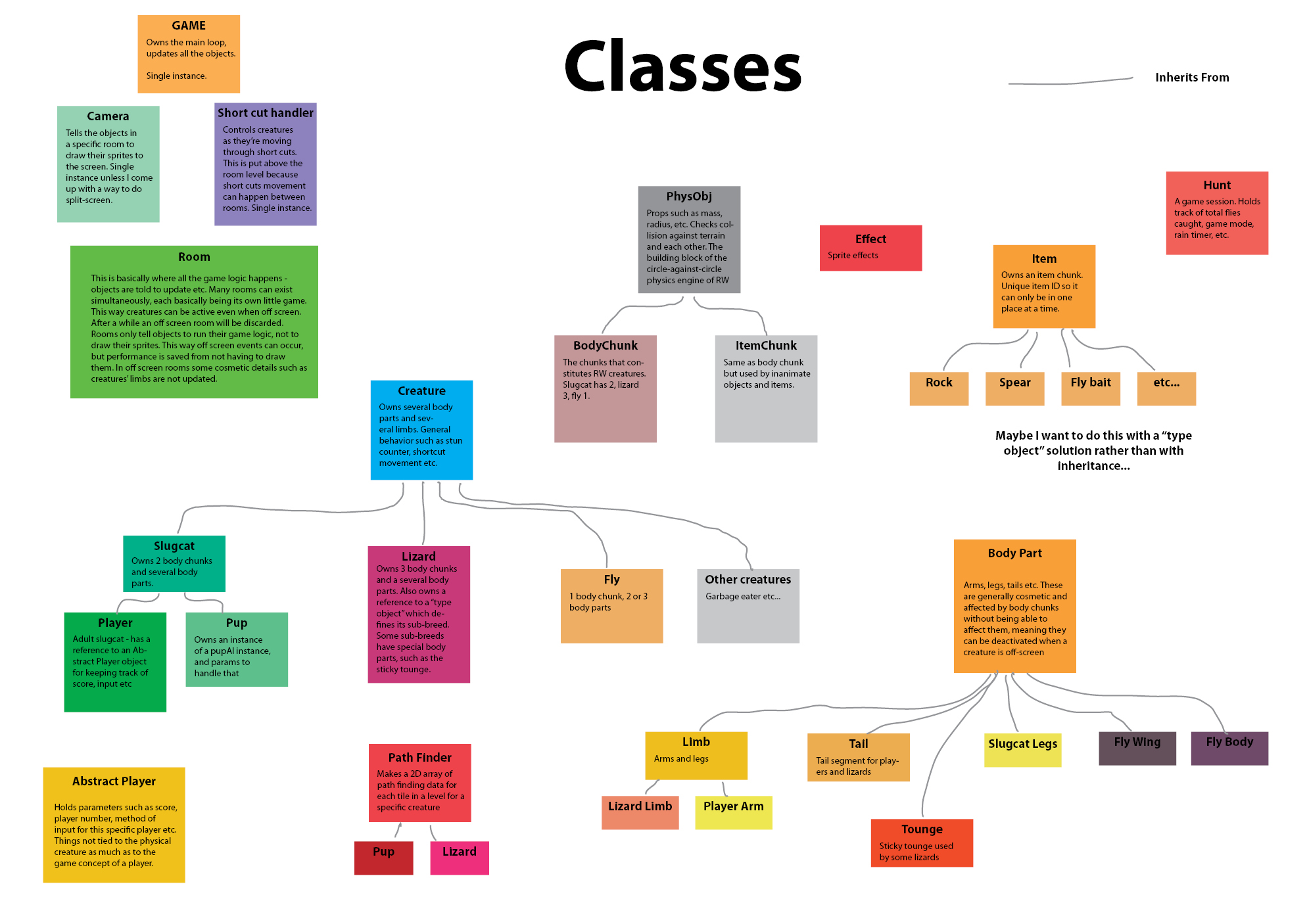
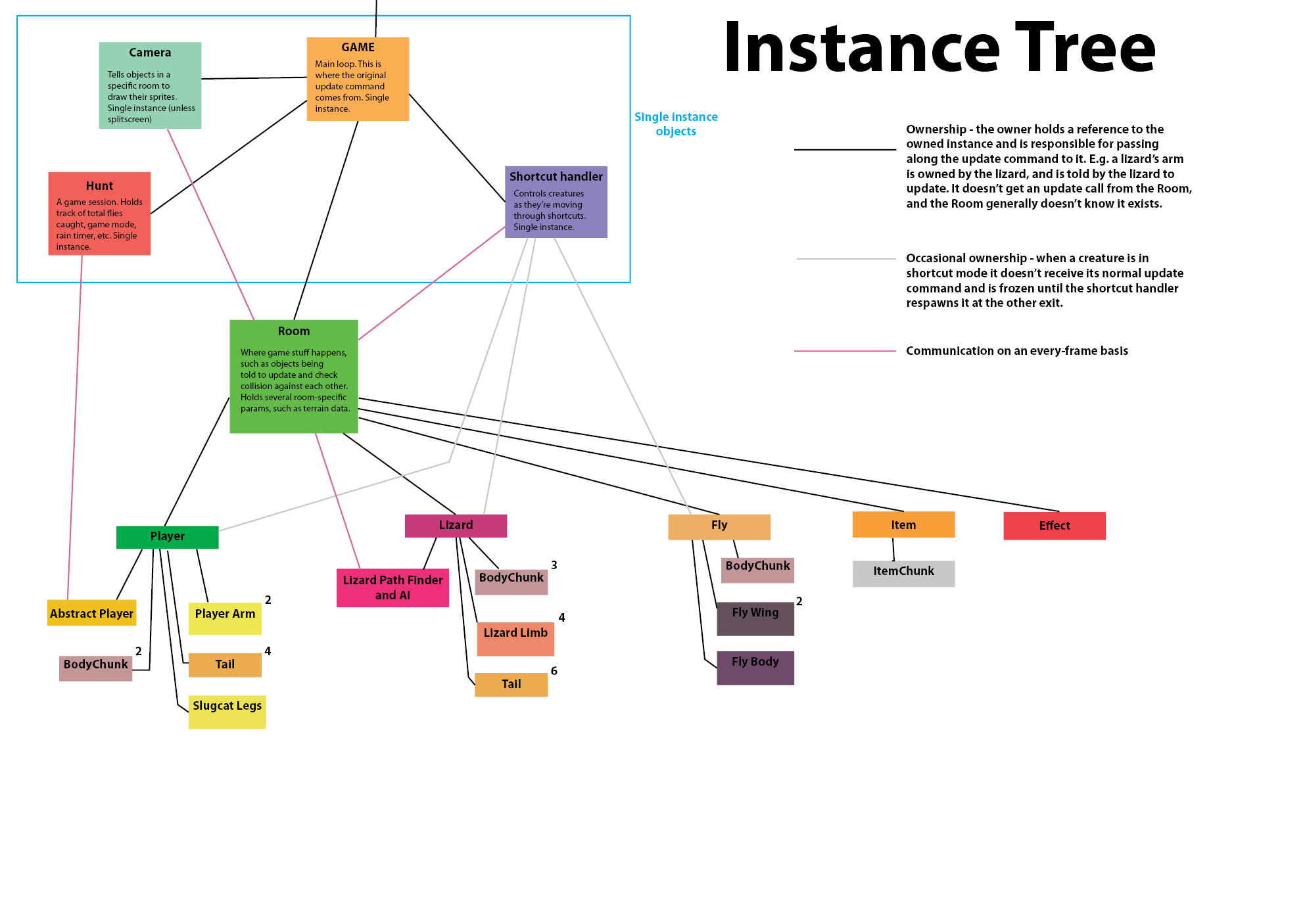
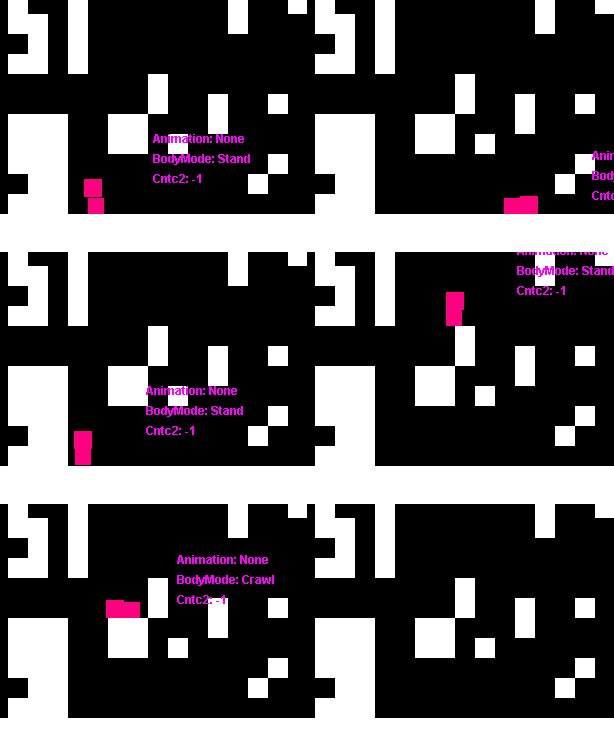
Update 222Quite a lot has happened! A basic "creature" (two dots) is in the game. I have the very basics of how a rain world creature works up and running, and this time around I have a much more general and slick framework for it. Basically a creature (or physical object, at the very top of the inheritance tree) consists of a number of BodyChunks, and a number of BodyChunkConnections. The former is the standard unit that builds bodies and moves about with classic newtonian physics, colliding with walls and each other. The latter is the internal bonds that hold the BodyChunks of a specific creature together, so they don't drift apart.
Basic terrain collision is in, but I'm not sure how well it works at this point because I haven't yet set up tools to test it properly. It's able to keep an object that moves around with random forces applied within the level boundries, so that's something. At this point it's a straight port from the old rain world code, but I think I'll go over it an re-think parts of it that are a bit whacky. It's certainly a huge help to have a template to look at when coding though. I don't have to invent the wheel, merely make it roll.
What I'm most proud of though, is my camera system. In previous games, I've always had a fairly standard approach to how I do rendering. When an object is created, it asks some kind of sprite engine for a couple of sprites. Then it stores them in a list, and each frame move them around. When deleted, it returns them to the sprite engine or deletes them.
Not this time around! My starting point was this - objects shouldn't be responsible for being visible, they should just exist, and instead there should be a camera
viewing them. Instead of having objects take care of their individual sprites, they should just take care of their behaviours, and the sprites should be handled by a self contained camera object. They shouldn't even know they're being watched.
Why do I want this? Because in the old game, the level you were viewing was the only one that existed. I tried to fake a bit of off-screen movement, but it wasn't the real deal. This time I want to make everything completely independent on whether it's being watched. The world should just exist, and the camera should be a ghost moving around watching it. The other big thing is that if I get Futile to work with unity's split screen, I could have two cameras viewing the same game world.
So this is the way I do this: Objects sign up to an IDrawable interface which contains an initiate method and a draw method. The Room has a DrawableObjects list, which contains all objects signed up to that interface. The Camera is assigned to watching a specific Room.
Inside the Camera, there's a sub-class (is that the term? A class defined within another class) called SpriteLeaser. My english wasn't really sufficient to come up with a good name for this thing, but basically it lends sprites to an object. It consists of only an array of sprites, a reference to an object and a "remove me" flag.
Say that the Camera changes rooms. Now it goes through all the drawables of the new room, and for each of them it creates a SpriteLeaser. The SpriteLeaser calls the object's initiate method, passes itself as a parameter, and says "Hi, I'm a SpriteLeaser at your service!" The object is like "Cool, I'm a Slugcat so I'm gonna need 12 sprites, this sprite should have this graphic, this sprite should have that graphic..." etc.
The next frame, the Camera will get its Update method called. Then it will go through all of its SpriteLeasers, and tell each of them to contact their respective objects through the Draw method, once again with themselves passed as a parameter. The object will rearrange the sprites according to its new position, and if it's slated for removal or in another room than the camera, it will also tell the SpriteLeaser to slate itself for removal.
The thing here is that the objects are passive. They don't take care of sprites, the just passively respond to the initiate and draw commands. If the camera moves to another room, the object won't even notice. It doesn't have to do anything, it just stops recieving the Draw commands, which are completely separate from all other code.
This was the best solution I could come up with for a self-contained camera and a world that goes about its behaviours with or without being watched. I know I'm probably re-inveting the wheel, but it was really fun doing it!
 —
— 


 Why oh why didn't I start with C# earlier?
 But those things I can probably solve as I go - the reason why I made Space Worms was that I needed something simpler to just see if I could get stuff to move on the screen before diving into the depths or RW code. Also I didn't want to have a lot of junk in there from when I didn't know very basic stuff, and I did dodge a few of those bullets - for example I wrote myVector[0] instead of myVector.x for a while, and similar stupid things. Not to say that I'm not still doing stupid things that I'll pull my hair over in a few months, but at least a few of them are out of the way.